
somble


somble is a native, unofficial Sailfish OS app that downloads the stored measurements from an Omron blood-pressure monitor over Bluetooth LE, charts them, and exports them. It talks to BlueZ directly over D-Bus (org.bluez GATT). Everything runs on the device - no account, no cloud, no telemetry; the data stays on your phone.
WHAT WORKS
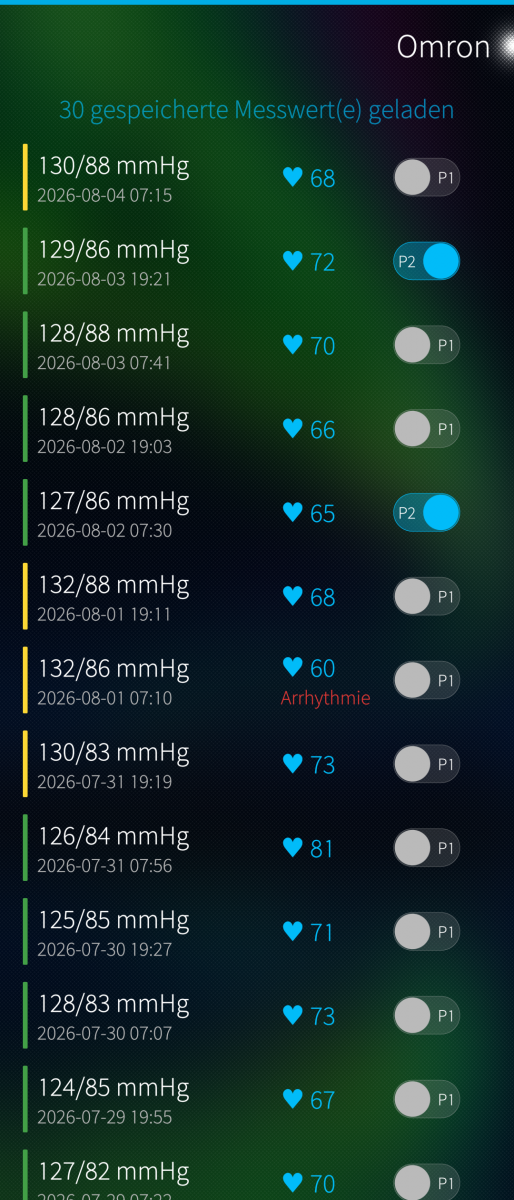
- Download over Bluetooth LE: reads the monitor's whole 100-slot ring buffer in one session
- Growing archive: each download is merged into a persistent local archive, so it accumulates far past the monitor's 100-reading limit; save/load named archive files
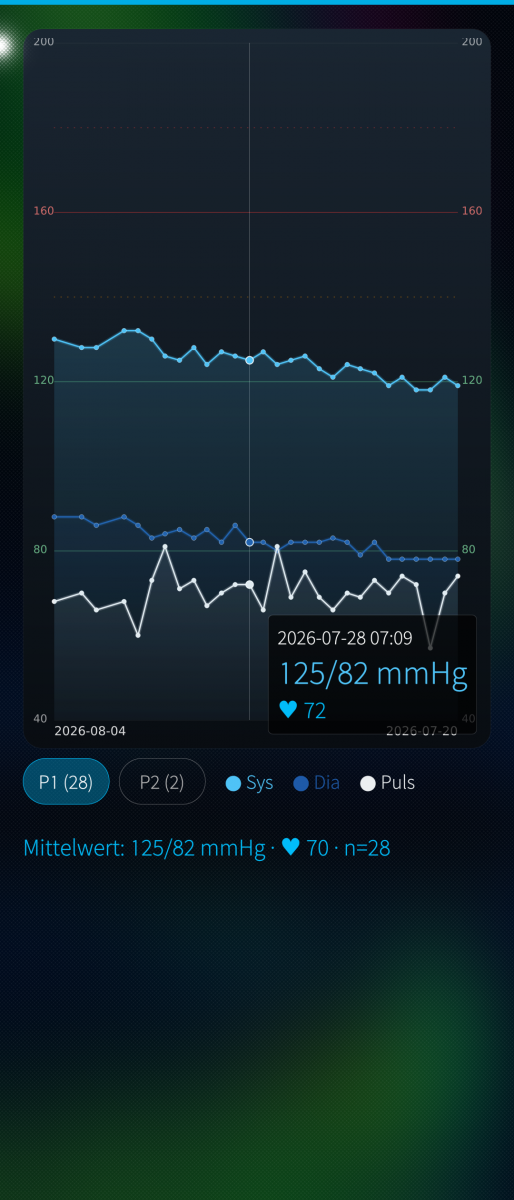
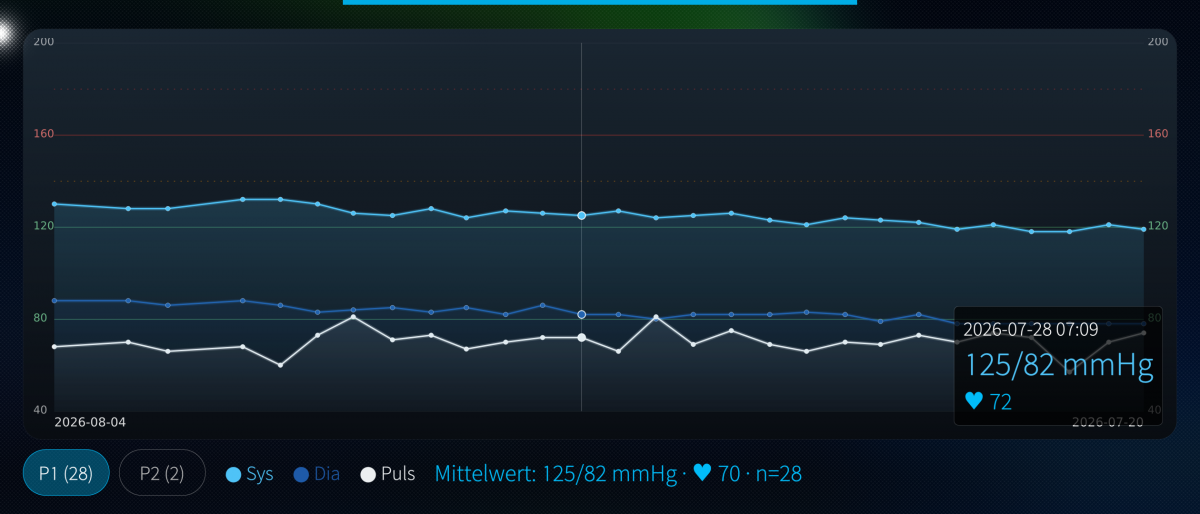
- Chart: systolic / diastolic / pulse over time - pinch to zoom the period, drag to move the window, tappable points, an "optimum" band around 120/80 and the hypertension thresholds marked
- Two people: a P1/P2 switch per reading (the monitor records no user), stored in the archive
- Device page: manufacturer, model, serial, revisions, battery, Bluetooth address, MTU, and the monitor's own clock
- Set the monitor's clock, delete single or all readings (deletions are remembered), export CSV and the chart as an image
- English and German UI; a plausibility filter drops implausible records
REQUIREMENTS
An Omron monitor speaking the vendor GATT service; developed against an EVOLV (HEM-7600T), whose record layout it uses. The monitor must be bonded once through Settings -> Bluetooth first - the app cannot pair by itself, because Sailfish does not let an ordinary app drive BlueZ pairing.
PLEASE READ - NOT SANDBOXED
The app ships with the Sailfish sandbox disabled. It has to: the BlueZ GATT signals it depends on are standard D-Bus interfaces that Sailjail's Bluetooth permission filters out, so the app cannot work jailed. It still only talks to your monitor over Bluetooth and writes only to its own files; there is no network access.
STATUS AND RESPONSIBLE USE
Proof of concept / work in progress, shared as is, no warranty (GPLv3). This is NOT a medical device and displays no medically validated data - it only reads back what the monitor stored. Never use it to diagnose or to adjust medication; only a doctor is qualified for that. The protocol was reconstructed from community reverse-engineering; the one write it performs (setting the clock) touches the same memory region believed to hold sensor calibration - optional and confirmed, but your monitor and your risk. Not affiliated with or endorsed by Omron.
ARCHITECTURES
aarch64 (Sailfish OS 5.0+). No armv7hl build.
Written with Claude Code (Anthropic).
Source, issues, releases: https://github.com/JimKnopfIoT/harbour-somble
Screenshots:
Category:
Keywords:
Application versions:
| Attachment | Size | Date |
|---|---|---|
 harbour-somble-0.3.0-1.aarch64.rpm harbour-somble-0.3.0-1.aarch64.rpm | 135.33 KB | 23/08/2026 - 23:25 |
Changelog:
- Per-model EEPROM profiles: EVOLV/HEM-7600T plus M700, RS7 Intelli IT,
Complete, M500/M7 Intelli IT, BP7450, M400/X4 smart and BP7250. The model is
identified from what the monitor reports, or chosen by hand on the Device
page. Fixes downloads returning nothing on anything but an EVOLV.
- Reads both user memories on models that have two, and seeds P1/P2 from them.
- The clock is only written on a recognised model, at an address a community
driver writes too, and only after the block read back from it verifies.
Monitors whose clock location is unconfirmed are never written to.
- A clock-only session no longer discards the last raw capture.
Comments
Vieno
Mon, 2026/08/24 - 21:37
Permalink
Splendid. Now it work fine with me. So many thanks to make this available for everyone. My Jolla phone does fells app-wise less crippled now.
JimKnopfIoT
Fri, 2026/08/21 - 20:16
Permalink
@Wolfgang You may try this:
Press and hold the memory/transfer button.
Within 2 seconds, also press and hold the START/STOP button.
Keep both buttons pressed for more than 5 seconds.
The device will reset to its default settings and then switch off.
All stored measured data will be deleted.
The device should restart. Then just give it a try using the Pulleye Menu to Download Data.
Vieno
Sun, 2026/08/23 - 23:20
Permalink
Thanks. That worked right away—I was able to download data. But I can’t set the date and time (using “Set the monitor’s clock”). A Bluetooth connection is established (the icon appears on the display), but then nothing happens. It keeps showing “not set.” And no data is transferred during the download either. Are these issues related?
It doesn’t work even when I set the date and time manually on the blood pressure monitor. Of course, this could be because the RS7 is slightly different from your EVOLV.
Or am I just doing something wrong?
P.S. Why is the icon on my phone just gray, even though it’s a nice red here? Is that intentional?
Best regards, Wolfgang
JimKnopfIoT
Sun, 2026/08/23 - 23:27
Permalink
Please try 0.3.0. Discovery should work now and also set time after discovery.
Vieno
Tue, 2026/08/25 - 21:04
Permalink
Hi,
thanks a lot for this app. It should basically work as well with my Omron RS7 Intelli IT. But it looks like I've paired it years ago with an Android device and now it rejects the pairing key. Any change I can fix this?
Only thing thats work without this pairing key is the device page.
Best regards,
Wolfgang