
RooTitanium


RooTitanium
A Chromium web browser for Sailfish OS 5.1, built on Qt 6 QtWebEngine with a UI written from scratch in QML — not a fork of an existing browser. Part of the RooT* app family.
[ENGLISH]
Prerequisite: SFOS 5.1.0.11
Version: aarch64
Version: armv7hl
Source code: https://github.com/RootGPT-YouTube/RooTitanium-SailfishOS
Telegram Group: https://t.me/+E7V-a7x4JbY1Njhk
RooTitanium is tested on:
- Sony Xperia 10 III (SFOS 5.1.0.11)
- Xiaomi POCO M4 Pro 4g "Fleur" (SFOS 5.1.0.11)
This application was developed using artificial intelligence technologies (Claude Code). Therefore, if the use of an application generated via a large-scale language model (LLM) is not comfortable for the user, it is recommended to avoid its installation and use. It is specified that any negative comment regarding this circumstance will not only be ignored but will result in the immediate blocking of the user.
I hereby disclaim any and all responsibility for the application, its functionality, and any consequences arising from its use. By choosing to use this application, the user acknowledges and accepts that they do so entirely at their own risk, and agrees that the developer shall not be held liable for any damages, losses, or adverse effects—whether direct, indirect, incidental, or consequential—resulting from the use or misuse of the application.
Browser engine — self-contained bundle
On Sailfish OS, Qt 6 is not an official platform component, and qt6-qtwebengine is not precompiled anywhere. RooTitanium therefore ships a self-contained bundle: the whole Qt 6 + QtWebEngine runtime (Chromium 122) is compiled from source over the community Qt 6 stack and installed under /home/rootitanium/, so the app needs no system Qt 6 and does not interfere with the platform.
- Hardware-accelerated rendering. QtWebEngine renders through EGL over libhybris (the device's Android GPU drivers). On the Xperia 10 III (Adreno 619) hardware acceleration is confirmed via chrome://gpu.
- Runs unsandboxed by design. Because the bundle lives outside the rootfs and needs full access to /home/rootitanium/, the hybris system libraries and Chromium's own --no-sandbox mode, the app declares Sandboxing=Disabled in its .desktop. In-app App Permissions (below) are what actually gate what sites can use.
- Custom ELF launcher. A small launcher in /usr/bin/harbour-rootitanium sets the bundle environment and execs the browser, forging argv[0] so Lipstick matches the window to a single app cover.
Features (1.0)
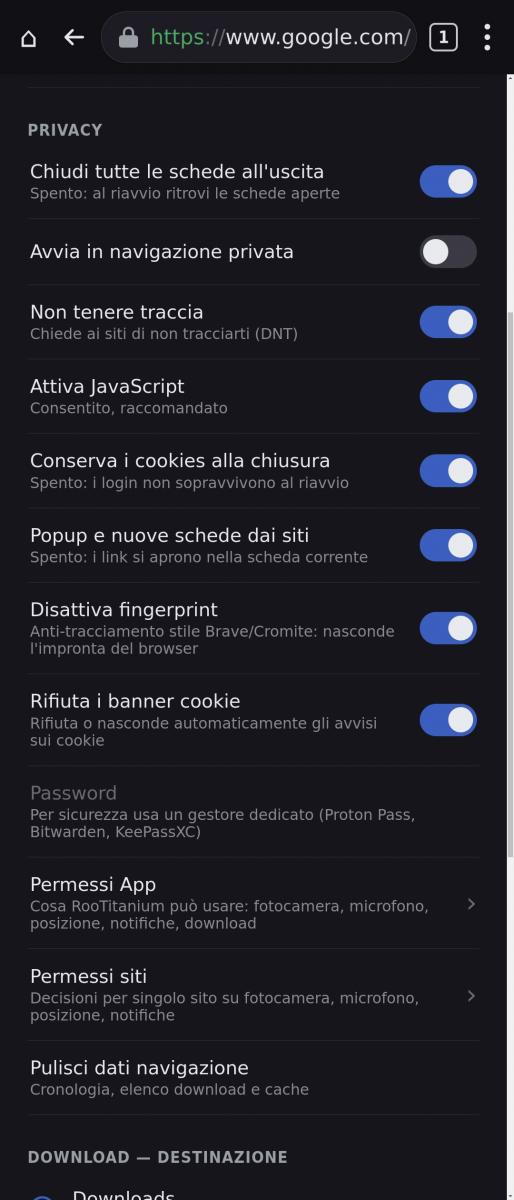
- Tabs and private (incognito) tabs, with a tab switcher and per-mode counts; optional "start in private", "close all tabs on exit" or session restore.
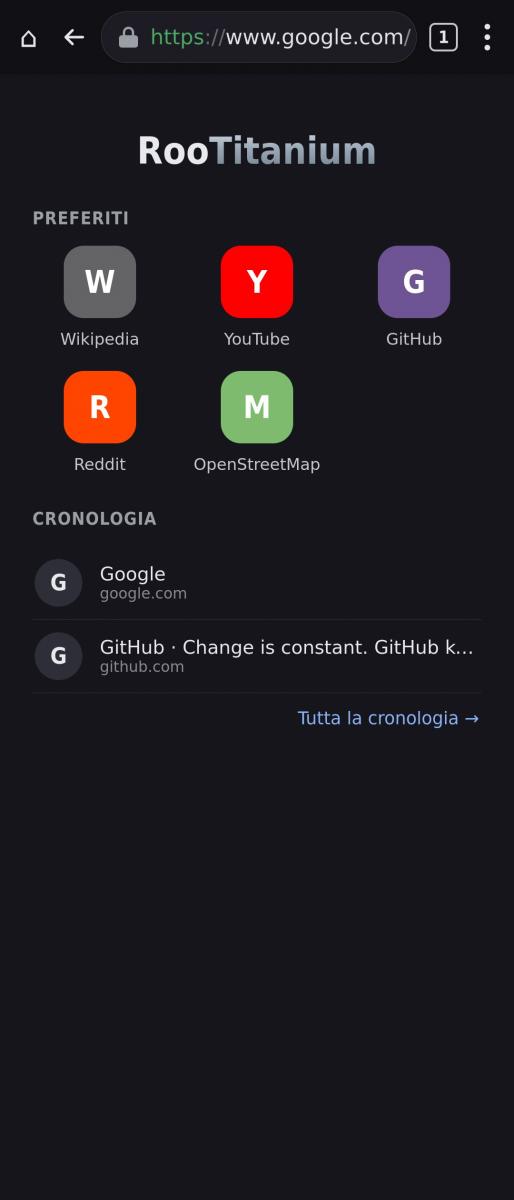
- HOME page with a Favorites grid (your chosen bookmarks) and a History list, editable in place.
- Address bar with search-or-URL entry and selectable search engine (DuckDuckGo, Google, Bing, Startpage).
- Bookmarks (persistent, SQLite) with a HOME-favorites toggle and reordering, and History with clear-all.
- Downloads with a chosen destination folder (Downloads / Documents / Pictures / Videos / Music), live progress, open and cancel.
- Find in page, Share, Save page as PDF, Desktop/Mobile site toggle, and landscape rotation (manual, plus automatic for fullscreen video).
- Native-feeling context menus (link / image / text), touch-selection menu, and custom JavaScript dialogs (alert / confirm / prompt) scaled for the device.
- Custom on-screen keyboard (QtVirtualKeyboard, themed for the browser).
- Privacy controls: Do-Not-Track, anti-fingerprinting (Brave/Cromite-style farbling), automatic cookie-banner rejection, a Client-Hints / user-agent interceptor that presents the browser as Google Chrome for site compatibility, session-cookie clearing, JavaScript and popup toggles, forced dark mode, and one-tap clear browsing data.
- App Permissions (master switches for camera, microphone, location, notifications and downloads — a gate above the per-site choices) and Site Permissions (per-site camera / microphone / location / notifications).
- Background tab lifecycle (freeze / discard) to keep heavy sites from stalling the browser.
- Bilingual UI (English / Italian): Italian on Italian devices, English everywhere else — chosen automatically from the system language.
The RPM payload goes to /home/rootitanium/ (the /home partition), while the .desktop, icons and the ELF launcher go to the rootfs under /usr. Conventions shared with the RooT* family: package harbour-rootitanium, version single-sourced from the spec.
Engine, compatibility & trademarks
RooTitanium renders pages with Qt 6 QtWebEngine (Chromium 122), bundled as described above and in NOTICE.md. For site compatibility the browser presents itself as Google Chrome through a Client-Hints / user-agent interceptor; this is identification only and does not make it a Google product.
"Chromium" and "Google Chrome" are trademarks of Google LLC, and "Qt" is a trademark of The Qt Company Ltd. RooTitanium is an independent project, not affiliated with, sponsored by or endorsed by Google LLC or The Qt Company; the names are used solely for identification.
License
GPL-3.0-or-later © 2026 RootGPT. See LICENSE and NOTICE.md for the third-party components (Qt 6 / QtWebEngine, Chromium) bundled in the RPM.
[ITALIANO]
Un browser web Chromium per Sailfish OS 5.1, basato su Qt 6 QtWebEngine, con una UI scritta da zero in QML — non un fork di un browser esistente. Parte della famiglia di app RooT*.
Requisiti: SFOS 5.1.0.11
Versione: aarch64
Versione: armv7hl
Source code: https://github.com/RootGPT-YouTube/RooTitanium-SailfishOS
Gruppo Telegram: https://t.me/+E7V-a7x4JbY1Njhk
RooTitanium è testato:
- Sony Xperia 10 III (SFOS 5.1.0.11)
Questa applicazione è stata sviluppata utilizzando tecnologie di intelligenza artificiale (Claude Code). Pertanto, se l'utilizzo di un'applicazione generata tramite un modello linguistico su larga scala (LLM) non è gradito all'utente, se ne sconsiglia l'installazione e l'uso. Si precisa che qualsiasi commento negativo relativo a tale circostanza non solo verrà ignorato, ma comporterà il blocco immediato dell'utente.
Con la presente declino ogni responsabilità relativa all’applicazione, al suo funzionamento e a qualsiasi conseguenza derivante dal suo utilizzo. L’utente, scegliendo di utilizzare l’applicazione, riconosce e accetta di farlo a proprio ed esclusivo rischio, e concorda che lo sviluppatore non potrà essere ritenuto responsabile per eventuali danni, perdite o effetti negativi — diretti, indiretti, incidentali o consequenziali — derivanti dall’uso o dall’uso improprio dell’applicazione.
Motore del browser — bundle self-contained
Su Sailfish OS, Qt 6 non è un componente ufficiale della piattaforma, e qt6-qtwebengine non è precompilato da nessuna parte. RooTitanium distribuisce quindi un bundle self-contained: l'intero runtime Qt 6 + QtWebEngine (Chromium 122) è compilato dai sorgenti sopra lo stack Qt 6 della community e installato sotto /home/rootitanium/, così l'app non richiede alcun Qt 6 di sistema e non interferisce con la piattaforma.
- Rendering accelerato in hardware. QtWebEngine renderizza tramite EGL su libhybris (i driver GPU Android del dispositivo). Sull'Xperia 10 III (Adreno 619) l'accelerazione hardware è confermata via chrome://gpu.
- Gira senza sandbox, by design. Poiché il bundle vive fuori dal rootfs e richiede accesso pieno a /home/rootitanium/, alle librerie di sistema hybris e alla modalità --no-sandbox di Chromium, l'app dichiara Sandboxing=Disabled nel suo .desktop. Sono i Permessi App in-app (sotto) a controllare davvero cosa i siti possono usare.
- Launcher ELF dedicato. Un piccolo launcher in /usr/bin/harbour-rootitanium imposta l'ambiente del bundle ed esegue il browser, forgiando argv[0] così che Lipstick agganci la finestra a un'unica cover dell'app.
Funzionalità (1.0)
- Schede e schede private (incognito), con selettore schede e conteggi per modalità; opzioni "avvia in privata", "chiudi tutte le schede all'uscita" o ripristino sessione.
- Pagina HOME con una griglia Preferiti (i segnalibri che scegli tu) e un elenco Cronologia, modificabili al volo.
- Barra degli indirizzi con inserimento cerca-o-URL e motore di ricerca selezionabile (DuckDuckGo, Google, Bing, Startpage).
- Segnalibri (persistenti, SQLite) con toggle Preferiti-in-HOME e riordino, e Cronologia con svuota-tutto.
- Download con cartella di destinazione a scelta (Download / Documenti / Immagini / Video / Musica), progresso live, apri e annulla.
- Cerca nella pagina, Condividi, Salva pagina come PDF, toggle sito Desktop/Mobile e rotazione orizzontale (manuale, più automatica per il video a tutto schermo).
- Menu contestuali dall'aspetto nativo (link / immagine / testo), menu di selezione touch e dialoghi JavaScript personalizzati (alert / confirm / prompt) scalati per il dispositivo.
- Tastiera a schermo personalizzata (QtVirtualKeyboard, a tema col browser).
- Controlli privacy: Do-Not-Track, anti-fingerprinting (farbling stile Brave/Cromite), rifiuto automatico dei banner cookie, un interceptor Client-Hints / user-agent che presenta il browser come Google Chrome per compatibilità coi siti, pulizia dei cookie di sessione, toggle per JavaScript e popup, modalità scura forzata e pulizia dati di navigazione con un tap.
- Permessi App (interruttori master per fotocamera, microfono, posizione, notifiche e download — un cancello sopra le scelte per-sito) e Permessi siti (per singolo sito: fotocamera / microfono / posizione / notifiche).
- Ciclo di vita delle schede in background (freeze / discard) per evitare che i siti pesanti blocchino il browser.
- UI bilingue (Inglese / Italiano): italiano sui dispositivi italiani, inglese altrove — scelta automaticamente dalla lingua di sistema.
Il payload dell'RPM va in /home/rootitanium/ (partizione /home), mentre il .desktop, le icone e il launcher ELF vanno nel rootfs sotto /usr. Convenzioni condivise con la famiglia RooT*: pacchetto harbour-rootitanium, versione single-source dallo spec.
Motore, compatibilità e marchi
RooTitanium mostra le pagine con Qt 6 QtWebEngine (Chromium 122), impacchettato come descritto sopra e in NOTICE.md. Per compatibilità con i siti il browser si presenta come Google Chrome tramite un interceptor di Client-Hints / user-agent; è solo identificazione e non lo rende un prodotto Google.
"Chromium" e "Google Chrome" sono marchi di Google LLC, e "Qt" è un marchio di The Qt Company Ltd. RooTitanium è un progetto indipendente, non affiliato, sponsorizzato o approvato da Google LLC o The Qt Company; i nomi sono usati solo a scopo identificativo.
Licenza
GPL-3.0-or-later © 2026 RootGPT. Vedi LICENSE e NOTICE.md per i componenti di terze parti (Qt 6 / QtWebEngine, Chromium) inclusi nell'RPM.
Screenshots:
Category:
Application versions:
| Attachment | Size | Date |
|---|---|---|
 harbour-rootitanium-2.1-1.aarch64.rpm harbour-rootitanium-2.1-1.aarch64.rpm | 94.74 MB | 29/09/2026 - 15:15 |
| harbour-rootitanium-2.1-1.armv7hl.rpm | 90.65 MB | 09/10/2026 - 09:49 |
| harbour-rootitanium-2.5-1.aarch64.rpm | 113.98 MB | 12/10/2026 - 20:08 |
| harbour-rootitanium-2.5-1.armv7hl.rpm | 120.96 MB | 12/10/2026 - 20:08 |
| harbour-rootitanium-2.6-1.aarch64.rpm | 114.05 MB | 15/10/2026 - 18:57 |
| harbour-rootitanium-2.6-1.armv7hl.rpm | 121.03 MB | 15/10/2026 - 18:57 |
| harbour-rootitanium-2.7-2.aarch64.rpm | 114.06 MB | 15/10/2026 - 20:39 |
| harbour-rootitanium-2.7-2.armv7hl.rpm | 121.05 MB | 15/10/2026 - 20:39 |
| harbour-rootitanium-2.8-2.armv7hl.rpm | 120.93 MB | 19/10/2026 - 10:17 |
| harbour-rootitanium-2.8-2.aarch64.rpm | 113.92 MB | 19/10/2026 - 10:17 |
| harbour-rootitanium-2.8.1-1.armv7hl.rpm | 120.94 MB | 20/10/2026 - 13:29 |
| harbour-rootitanium-2.8.1-1.aarch64.rpm | 113.96 MB | 20/10/2026 - 13:29 |
Changelog:
Changelog <2.1:
- Some issue with heavy social, like X.com;
- No DRM.
- Mobile file picker (3db7d2e) — the file upload (<input type=file>) now opens a full‑screen native picker instead of the tiny desktop dialog: Home/Download/Images/Documents/Video shortcuts, folder navigation, multi‑selection with checkmarks, and an Upload button.
- Reading Mode (69f8dee) — in the ⋮ menu: extracts the article using Mozilla’s Readability.js and displays it with serif typography on light/dark theme; A−/A+ buttons (size is remembered) and ✕ to return to the article exactly where you left off.
- Accept-Language from actual locale (7375cff) — websites no longer force Italian on foreign devices.
- Two‑finger pinch zoom (99cdcb0) — mobile page‑scale pipeline enabled (--enable-viewport); internal pages locked at scale 1.
- Keyboard (3dab90e) — long language names (for example: “norsk bokmål”) now fit inside the space bar instead of overflowing.
- Added the ability to open multiple links in RooTitanium (FIX).
- Added some privacy features in settings.
- Various fixes.
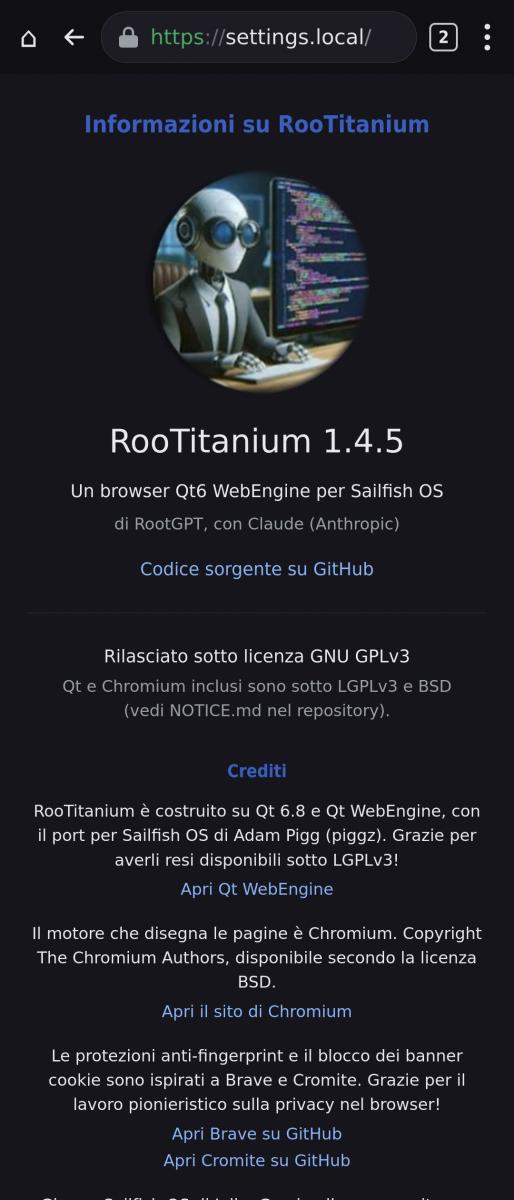
- About Page in Settings;
- Fix settings page;
- More fix, fix, fix...
- Fixed black square
- Fix for Xiaomi POCO M4 Pro 4g "Fleur".
- Fixed: HTML <select> dropdowns were impossible to pick from (taps went through the popup)
- Engine updated to Qt WebEngine 6.8.4 — Chromium 122 base with security fixes backported up to 138.0.7204.96
- Updated credits (Chromium/Qt security backports; Sailfish patches by Rinigus, piggz, nephros)
- Fix YouTube Player Control.
- Add system keyboard to the browser (Thx Cristoffer/Imperador).
- Fixed selection test function.
- Added hardware video decoder.
- Many fixes;
- Added swipe for BACK and NEXT page (center to DX for BACK, center to SX for NEXT).
Changelog 2.1:
- Fixed some social networks bugs.
- Arch armv7hl beta version.
Changelog 2.5:
- New engine: Chromium 140 (Qt WebEngine 6.140 on Qt 6.12), with security fixes up to Chromium 154. It was previously Chromium 122. The Qt stack is compiled by us and travels inside the app as before.
- Graphics acceleration: with Chromium 140, the page remained black because the engine no longer shares the GPU with Qt on its own. Now the app handles the sharing. Tested on Mali (POCO M4 Pro) and Adreno (Xperia 10 III), with WebGL. Approximately 14% less CPU usage than version 2.2 on the same video.
- Video with the phone's decoder: no more diagonally striped image. Some chips declare a different row width than the actual one (WebM on the Xperia 10 III, .mp4 on other phones); now the correct width is derived from the pixels.
- Permissions: if the general "App Permissions" switch is off and a site requests the microphone or location, a warning is displayed instead of silently refusing.
- Settings: no longer close the app when a switch is touched.
- History: you can now delete a single entry (the ✕ next to each row), an entire site, or a period (last hour, today, last 7 days, all). Each group deletion asks for confirmation and states how many entries will disappear. When entries are deleted, the memory of visited links is also removed, meaning the color of already opened links.
- Address bar: on internal pages (History, Bookmarks, Settings…) it still showed the address of the previous site; now it shows the address of the open page.
- Dependencies: declared libgbm (mesa-llvmpipe-libgbm) and other system libraries used by the package. They are installed automatically.
Changelog 2.7:
- Reload button in the toolbar, between Back and the address bar.
- HOME in a new tab: with the option on, the ⌂ button opens the home page in a new tab instead of replacing the current one. Turn it on in Settings › Home page › "⌂ opens a new tab".
- New icon in a steel style.
- Google Maps: "Directions" now works and shows the route. Before, it failed with "unsupported URL scheme". "Start" now shows a notice instead of sending you to the Play Store, because Google offers turn-by-turn navigation only in its Android app. For driving we recommend Pure Maps.
- User agent: the browser now reports its real version, Chrome 140, instead of the old 122.
- Hide-on-scroll address bar: it now comes back on every new page. Before, on short pages such as Site Permissions, you could not go back.
- Added notifications from sites.
Changelog 2.8:
- Push notifications from websites (BETA, off by default). With Foghorn (UnifiedPush, available on OpenRepos) websites can send notifications even when the app is closed, without Google servers. Messages are encrypted from the website to your phone. Settings → Website push notifications, with an Instructions page. Available on both aarch64 and armv7hl.
- Bookmarks can now be edited: name and address (✎ on the Bookmarks page).
- Smooth animations for menus, dialogs, popups and pages
(Settings → Theme, off by default).
- Pages no longer switch to the desktop version by themselves. When the phone closed a page's process (tab in the background for a while, low memory, crash), reloading brought it back without the mobile zoom, so the site showed its desktop layout even with "Desktop site" turned off.
- File picker: folders could not be opened, so files could not be uploaded. Fixed.
- Toggles in Settings no longer jump the page back to the top.
- Swipe Back/Forward and the privacy protections work again on the first page of every new site.
Comments
rob_k
Mon, 2026/07/20 - 21:55
Permalink
Interesting development. Strange that on X10iii 5.1.0.11, I can only use a part of the screen. Let's say only the part not covered by the SFOS keyboard. Then, the Qt6 keyboard takes a part as well, resulting in 40% browser visible
RootGPT
Mon, 2026/07/20 - 22:24
Permalink
That's strange because I've X10III too and I don't have the same bug.
Three things would help me pin it down:
- the RPM version (rpm -q harbour-rootitanium) — it might not be 1.2-1;
- does it happen right at startup, or only after you tap the URL bar for the first time?
- do you have an alternative system keyboard installed, or homescreen rotation enabled?
eatdirt
Mon, 2026/07/20 - 16:36
Permalink
How do you intend to block complaining users as specified in the release notes? :) My complain is not about Claude but about the gas powered data center over which it runs and polluting Memphis and the rest of the world...
RootGPT
Mon, 2026/07/20 - 22:17
Permalink
By "blocking" I just meant ignoring. What I mean in the app description is: criticism about the fact that I use AI (Claude Code, in my case) gets ignored or deleted. Any other constructive comment or request gets considered, exactly as I've always done.
That said, since you asked it politely, I'll answer once. The Memphis gas turbines are xAI's (Colossus), not Anthropic's. Claude runs on AWS/GCP infrastructure. But that's just a correction, not a defense: data centers burn a huge amount of energy and will burn more, whoever runs them.
The problem doesn't go away.
What I can say about this project: it's a small SailfishOS browser, and the AI assistance amounts to a handful of dev sessions. Without it I'd have taken a thousand times longer, or simply wouldn't have been able to build it at all. So I'm not claiming "the energy would have been spent anyway": I'm saying this app exists because of that energy, and to me it's worth spending it on something like this, rather than on making kittens sing...
I don't think that settles the ethics, but that's where I stand.
amol
Sun, 2026/07/19 - 16:48
Permalink
Surprisingly it seems more memory lightweight than the other Sailfishos browsers.
I think it would be amazing one day to read an article on your LLM empowered workflow for sailfish development as at this point you released a lot of content
RootGPT
Sun, 2026/07/19 - 19:40
Permalink
Thanks for your feedback!
duskull
Thu, 2026/07/16 - 19:46
Permalink
Great UI, very precise and smooth rendering. One issue - some websites default to Italian language, please fix. Jolla C2, will soon test on the new Jolla 2.
RootGPT
Sun, 2026/07/19 - 15:11
Permalink
Fixed! ;)
kempertom
Thu, 2026/07/16 - 11:45
Permalink
It doesn't start on community port for Motorola G7 Power with SFOS 5.0.0.67
frankps
Thu, 2026/07/16 - 12:17
Permalink
The dev stated:
Prerequisite: SFOS 5.1.0.11 · aarch64 only
ahjolinna
Thu, 2026/07/16 - 11:36
Permalink
I tried youtube and it was in italian :D tried changing it but wouldnt pick what I choose (in the cookies popup page)
RootGPT
Sun, 2026/07/19 - 15:11
Permalink
Fixed! ;)
frankps
Thu, 2026/07/16 - 10:24
Permalink
Just tried it with a few sites. Perfect rendering and very smooth scrolling. Is it possible to get native on-screen keyboard? I need Norwegian keymap (æøå)...
RootGPT
Thu, 2026/07/16 - 11:07
Permalink
Unfortunately not. The native SFOS keyboard is based on Qt 5 (maybe 5.6, I’m not sure) and Chromium only runs on Qt 6. I had to create an environment suitable for Qt 6, and the native keyboard wouldn’t run in it. Anyway, the Norwegian layout is already present: you need to tap the keyboard’s globe icon and select “Norsk Bokmål”.
If you like my app, I invite you to rate it. I’m asking because there’s someone who enjoys giving 1 star to all my apps no matter what. Probably someone who hates AIs…
piggz
Tue, 2026/09/29 - 18:35
Permalink
Not true, there is a qt6 maliit plugin in chum .. along with the rest of qt6. I think it was wholly unnecessary for you to bundle qt6 in your app.
frankps
Thu, 2026/07/16 - 13:02
Permalink
Well, I am not one of them. But I am not sure where I currently standing. I prefer human coded apps, but I admit that AI is the future also for open source projects. Torvald Linus just nailed it: https://www.theregister.com/ai-and-ml/2026/07/15/linus-torvalds-tells-ai...
The important thing for me is: The code should be available, readable, understandable and maintainable. It means that it should follow coding styles of a project or for the platform. That gives me the needed security that there is not a hidden backdoor in the app. I have no idea who you are, and as a enduser, I cannot read your code and most likely no devs will take the time to review your code. This is a lack of trust and not that you have used AI.
Another issue is that I have a feeling that most AI code seems bloated. File sizes are considerably bigger then when humanly coded.
frankps
Thu, 2026/07/16 - 12:49
Permalink
Any reason for calling it Norsk bokmål? Could it be only called Norsk? Norsk would fit in to the space bar...
RootGPT
Sun, 2026/07/19 - 15:12
Permalink
Fixed! ;)
RootGPT
Thu, 2026/07/16 - 15:08
Permalink
I think I will fix it in the next update.
windes
Thu, 2026/07/16 - 09:38
Permalink
On armv7hl is impossible?..
RootGPT
Thu, 2026/07/16 - 10:55
Permalink
Sorry, but unfortunately not, because Qt6 has dropped the 32-bit platform...
birdzhang
Thu, 2026/07/16 - 06:32
Permalink
Great job!
Tested with antutu.com/html5 on xiaomi pad 5, rootitanium can get 41526 score, sailfish-browser(sfos 5.2.0.11) only 24540 score.
RootGPT
Thu, 2026/07/16 - 11:09
Permalink
Thanks for feedback! If you like, vote for it!
Pages