
OKBoard


OKBoard (a.k.a. Magic Keyboard) is a gesture based keyboard that allow single stroke typing. Usage is explained in this video. English, French and Dutch are supported without the need for additional packages, other language resources are available in separate packages, e.g. for Swedish (okb-lang-sv). It currently works on Jolla phone, Xperia X / XA2 / 10 / 10 plus. Larger phones (such as XA2 plus/ultra & Fxtec Pro1) may be supported in a later release.
Do not use other third party keyboards at the same time (unless they are just simple layouts for new languages).
Source code: http://git.tuxfamily.org/okboard/okb-engine.git/ and http://git.tuxfamily.org/okboard/okb-keyboard.git/. Instructions for adding new languages are included in README.md files (latin alphabet only at the moment).
If you get an error message about missing dependencies (dbus-python, patch ...) when installing, just run "pkcon refresh" as root and try again. Also some issues may be solved by uninstalling and reinstalling.
OKBoard tends to break for each new Sailfish release, so if possible, wait for other users reports before upgrading to a new OS version.
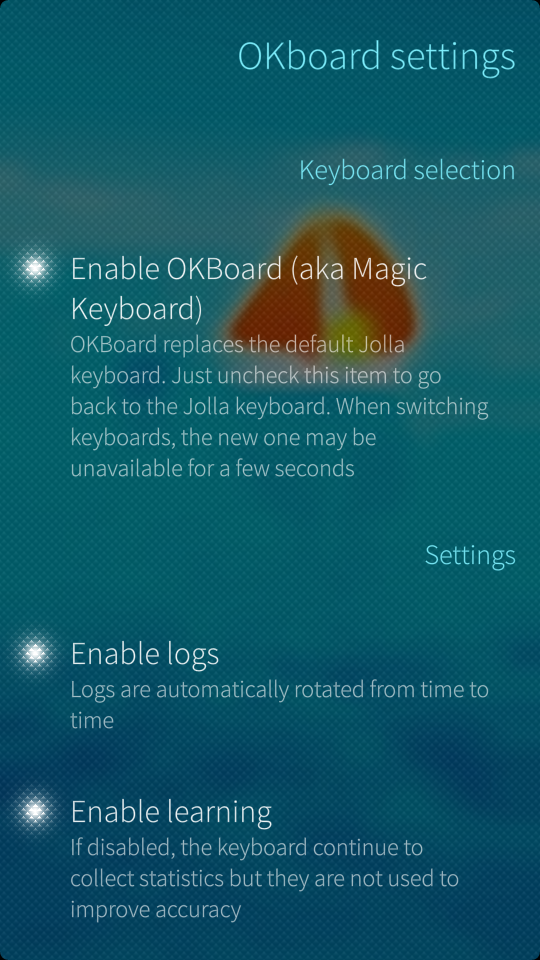
Screenshots:

Category:
Application versions:
| Attachment | Size | Date |
|---|---|---|
 okboard-full-0.6.35-1.armv7hl.rpm | 10.5 MB | 18/09/2022 - 14:33 |
| okboard-full-0.6.35-1.aarch64.rpm | 10.51 MB | 18/09/2022 - 14:33 |
| okboard-full-0.6.37-1.aarch64.rpm | 10.51 MB | 05/02/2023 - 14:36 |
| okboard-full-0.6.37-1.armv7hl.rpm | 10.5 MB | 05/02/2023 - 14:36 |
| okboard-full-0.6.38-1.armv7hl.rpm | 10.5 MB | 02/02/2025 - 19:16 |
| okboard-full-0.6.38-1.aarch64.rpm | 10.51 MB | 02/02/2025 - 19:16 |
| okboard-full-0.6.39-1.armv7hl.rpm | 10.5 MB | 21/09/2026 - 08:53 |
| okboard-full-0.6.39-1.aarch64.rpm | 10.51 MB | 21/09/2026 - 08:53 |
Changelog:
0.6.39 : Support for new Jolla Phone 2026 and hopefully other 5.2 devices
0.6.38 : Support for SFOS 5 + minor bugfix
0.6.37 : Support for SFOS 4.5
0.6.35 : Disable Sailjail to allow admin app to start on SFOS 4
Comments
eber42
Sun, 2017/03/05 - 14:26
Permalink
This looks similar to the issue damoleon reported a few comments below. Try 'pkcon refresh' and let us know if it works.
meegouser
Sun, 2017/03/05 - 21:57
Permalink
Yes, that worked. The installation took forever and Warehouse froze plenty times, but now it runs very well (including German package). Thanks for the tip!
ade
Sat, 2017/03/04 - 19:28
Permalink
Hi Eber42,
By default, OKBoard doesn't work with for example the various arrow keyboard by tmi. The reason is the language can't be properly detected.
The function updateContext in Gribouille.qml strips ".qml" from the filename to determine the language. That's okay if you have en.qml, but not if you have en_arrows.qml. If you do a substr(0,2) to get the first to characters it does work. Not sure if for example pt-BR will ever occur as language code, because than that code has to be a bit smarter.
eber42
Sun, 2017/03/05 - 18:29
Permalink
It will be included in the next release.
ade
Mon, 2018/05/07 - 14:13
Permalink
Kind reminder it is still not included in the latest release.
eber42
Mon, 2018/05/07 - 18:04
Permalink
It is supposed to be fixed in the current version (with a different fix than the one you suggested).
Could you give the reference of the arrow keyboard you use so that I could try it myself ?
ade
Mon, 2018/05/07 - 18:16
Permalink
I just looked at the code and did not see a change there, so applied my own fix again.
But you are right, it is already working without my suggested change. Thanks and sorry for my false conclusion.
Feathers_McGraw
Tue, 2017/02/28 - 20:25
Permalink
Thanks for your continued development and efforts to improve the experience on large screens/high DPI devices, it's working great for me on Fairphone 2 (although I had to uninstall and reinstall before the keyboard would show up - just restarting the device or the service wasn't sufficient).
Search accuracy is much better now, and the thickness of the line is better too.
I noticed I now get search suggestions in the bar above the keyboard even without the proprietary prediction library installed. Is that a new feature? If so, thank you again. Keeps getting better and better :)
eber42
Tue, 2017/02/28 - 21:36
Permalink
Thanks for your suggestion to use a Nexus 5 for testing, it allowed me to discover a lot of issues (including the regressions when the xt9 library is missing. The new release includes workarounds for these).
The issue with need to uninstall/reinstall has been widely reported but I have not been able to reproduce it so I do not know to solve it at the moment (I will probably seek guinea pigs for next release)
damoleon
Tue, 2017/02/21 - 16:10
Permalink
Hi, I've just tried on my jolla 1 version 2.1.0 through warehouse but I get Transaction /1290_baaeaece
Status: repo-not-available
Extra details :
File'.:mw/armv7hl/libpython3_4m1_0-3.4.3-1.6.3.armv7hl.rpm' not found on medium 'https://releases.jolla.com/releases/2.1.0.9/jolla/armv7hl'
Is there a workaround I could use ?
EDIT : I Solved it running pkcon refresh
campeon
Wed, 2017/01/11 - 21:14
Permalink
Please, update it to be improve the use with Jolla C or Intex.
I would mind to pay a little for its use.
campeon
Sat, 2017/01/14 - 02:01
Permalink
i tried with jolla C and it works amazing !!!
eber42
Mon, 2017/01/16 - 22:13
Permalink
It runs, but you get a fairly degraded user experience which is absolutely not representative of how it is supposed to behave. Apart from that, you should not have any issue.
Support for 5" devices is planned (when I manage to find one)
erlen
Tue, 2017/01/10 - 22:20
Permalink
Hello,
I updated it today, I am using the french keyboard, and when OKboard is activated the keyboard doesn't appear. When I turn it off, I recover the normal keyboard.
Do you have any idea what could be the problem?
Thenks
eber42
Tue, 2017/01/10 - 22:36
Permalink
Enable logs in the settings applications, start the keyboard and send me a copy of the logs (they are located in ~/.local/share/okboard) ... and use French in e-mail communication :-)
erlen
Tue, 2017/01/10 - 23:06
Permalink
The only file edited is prediect.log and it is empty.
And it is not working with english version neither.
Maybe it could be link with a package in patchmanager I will check, or a conflict with the file of the previous version?
erlen
Tue, 2017/01/10 - 23:13
Permalink
Ok it works, I remove the apps and install again and no more problem, conflict apparently.
eber42
Tue, 2017/01/10 - 23:00
Permalink
And if there is not recent log, just run the following command and send me the output:
rinigus
Sun, 2017/01/29 - 15:32
Permalink
I stumbled on the same problem - with OKboard 0.6 enabled, the keyboard did not appear. The logs were empty as well. So, I followed your advice and got maliit-server crash on the terminal while enabling OKboard:
After uninstalling OKboard and installing it again, all worked fine.
Thank you for working on it!
247
Tue, 2017/01/10 - 13:31
Permalink
for italian language, the keyboard hang up everytime you press a single letter...and suggestion always gives error...maybe the italian dictionary has to be updated too?
spidernik84
Tue, 2017/01/10 - 20:25
Permalink
Most definitely due to the version discrepancy. I will do my best to update the dictionary today. No guarantees :)
spidernik84
Tue, 2017/01/10 - 20:28
Permalink
I just saw eber42 remarks on waiting for a few days before redoing the dictionaries. I will prepare the necessary for the compilation, meanwhile.
ahmadhsalim
Wed, 2016/12/21 - 08:47
Permalink
Is it possible to compile this to ubuntu touch???
eber42
Mon, 2017/01/09 - 17:42
Permalink
It should be possible as Ubuntu touch also uses QML & maliit.
Mariusmssj
Sun, 2016/10/02 - 10:52
Permalink
Love this app but the only two quibles are the transparancy in some apps being way too hight so it's hard to see the keys and no auto space in android applications.
Are there any plans for updats that fix those issues?
Thank you :)
eber42
Mon, 2017/01/09 - 17:44
Permalink
Transparency issue is fixed.
I do not know how to improve the auto spacing (may require modifications in android support and/or maliit server)
Mariusmssj
Tue, 2017/01/10 - 00:03
Permalink
LOVE the update, thank you so much!!! Really appreciate all of your hard work
bambusmatte
Fri, 2016/09/23 - 12:52
Permalink
When I try to install the 0.5.10 .rpm file I get an Error: Missing dependencies: libpython3.4m.so.1.0 and pyotherside-qml-plugin-python3-qt5 >= 1.2.0
I use linux on my laptop, but I have no experience on sailfish... how do I add those? Or am I missing a step here?
edit: i use sailfish 2.0.2.51
spidernik84
Tue, 2016/02/09 - 19:50
Permalink
I've been testing the keyboard with the English and the Italian language. It works very well.
I'd say the transparency issue and the no-autospace in Android apps are the only two bummers, so far. I have hope.
247
Thu, 2016/02/04 - 15:31
Permalink
works very well but unfortunately i have transparency problems too...any fix?
Pages