
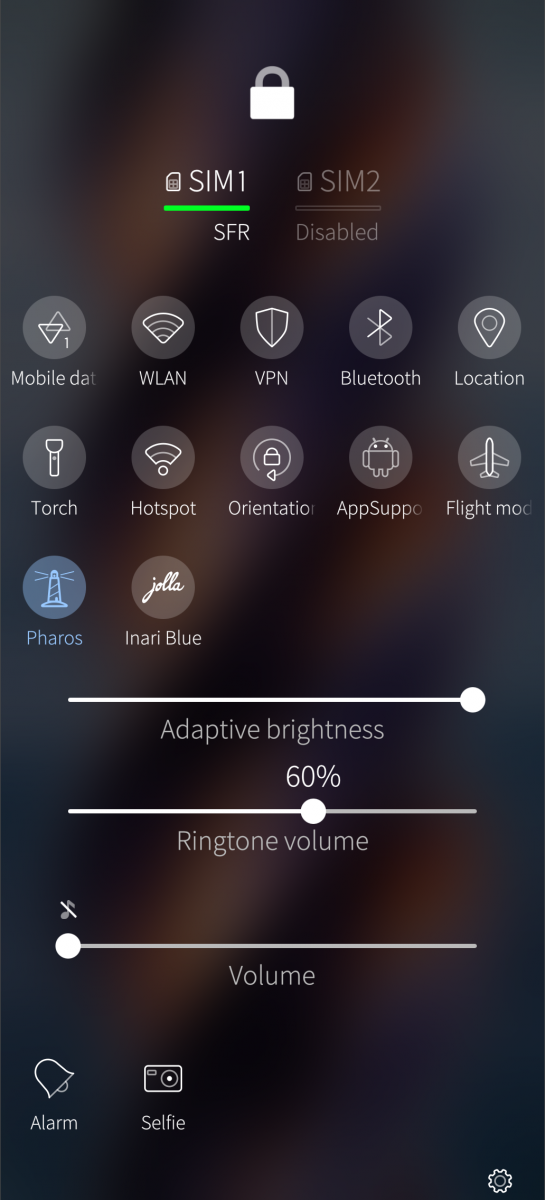
Pharos


It seems that we can use the Inari Blue LEDs in a constant mode.
As I am sometimes a bit absent-minded, I always put my phone down somewhere and never remember where. In the night, I can never find it again.
So I decided to use this feature so that I could see my JP2 in the dark.
Heavy LLM use here. (and as much analog brain as possible)
Only for the JP2
Inspired from the Jolla Inari Blue top menu button.
Off: does nothing special.
On: When the screen is off: turns one of the three Inari Blue LEDs on, plus the front notifications LED, both at very low power, constant mode, no blink.
The battery consumption when LEDs are ON seems to be around 1mA/h.
(Flight mode, no AAS = 10-11mA/h. With Paros ON,: 12mA/h)
Measured over one night with SystemDataScope.
I didn’t (ask to) implement a light sensor condition, as I (not it) thought this would ruin the deep sleep and perhaps consume as much battery as the LEDs themselves. Not sure, we’ll see these next days.
If you want to test it with me, you are welcome.
No warranties tho, your device may burn, all data may be lost.
Forum thread: https://forum.sailfishos.org/t/find-your-jp2-in-the-night-constant-mode-not-pattern-for-the-inari-blue-leds/35147
Source code: https://github.com/Ric9k-TMO-FSO/pharos
------------------------------------------------------------------------------------------------------------------------------------------
What the LLM says:
Pharos
Inspired from the original Jolla Inari Blue TOH LED toggle button and system.
Find your phone in the night. JP2 only.
A very dim, steady light while the display is off, to find our Sailfish OS phone in the dark.
- Front notification LED, dimmed through an MCE pattern (PatternPharos).
- With the Inari Blue TOH attached: its middle LED, in constant mode.
- A top menu switch to turn it on and off.
This project was created with heavy LLM use, and some human brain and knowledge where possible.
Please note: this has not yet been tested over the long term. You use it at your own risk, particularly in the event of data loss or damage to the software or hardware.
Source code: https://github.com/Ric9k-TMO-FSO/pharos
Compatibility and testing
- Briefly tested on the Jolla Phone (2026) with Sailfish OS 5.2.0.20 and the Inari Blue TOH.
- The TOH LED part only works on the Jolla Phone (2026) with the Inari Blue TOH: it needs the TOH connector, Jolla's symbiosis service and the Inari Blue LED controller.
- The front LED part uses a standard MCE LED pattern, so it may work on other Sailfish OS devices with a notification LED, but it has not been tested on any other device.
Credits
Pharos is an independent project. It is not affiliated with, endorsed by or supported by Jolla. "Jolla", "Sailfish OS" and "Inari Blue" are used only to name the hardware and software Pharos works with.
Pharos builds on code that Jolla published under the BSD-3-Clause licence, with thanks. Jolla's copyright notice is kept in the files derived from it:
- src/main.rs, src/controller.rs: derived from the blinker example of symbiosis (AW2023 register map, enable sequence, TOH detection and I²C borrowing).
- qml/EnableSwitch.qml: derived from the Inari Blue top menu switch.
- rpm/pharos.spec: Rust build section derived from symbiosis' spec.
Pharos also depends on the symbiosis library (BSD-3-Clause) at build time. All other files are original work.
Screenshots:
Category:
Application versions:
| Attachment | Size | Date |
|---|---|---|
 pharos-0.1.0-1.aarch64.rpm | 1.01 MB | 17/10/2026 - 23:34 |
Changelog:
(none)
Recent comments