
Car Hotspot


Car Hotspot (harbour-carhotspot) for Sailfish OS
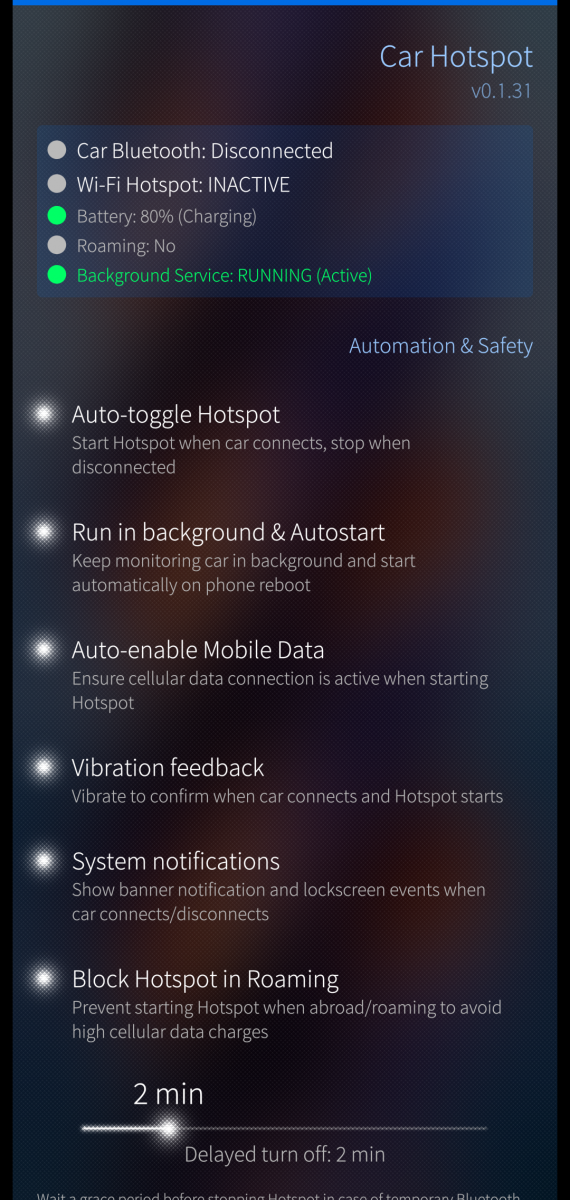
Car Hotspot(github) is an intelligent, automated Wi-Fi hotspot management utility for Sailfish OS. It seamlessly turns your smartphone into an in-car Wi-Fi router by activating mobile tethering the moment your phone connects to your car's Bluetooth hands-free / infotainment system, and safely turning it off when you leave.
Features
- Smart Automation: Automatically activates Wi-Fi hotspot upon pairing with your designated car Bluetooth device.
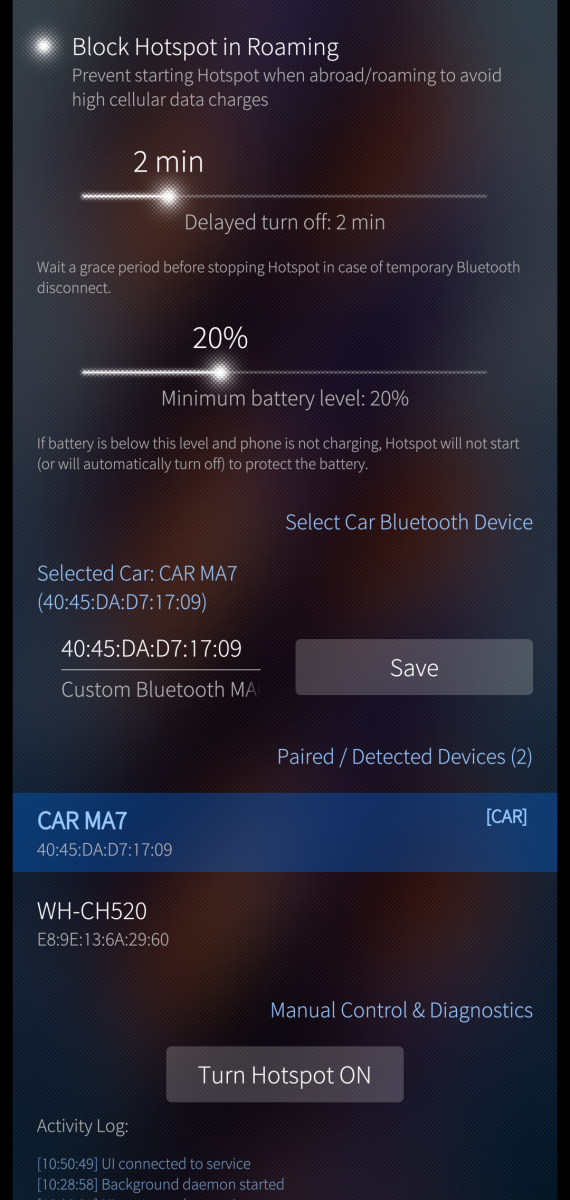
- Grace Period (Delayed Shutdown): Configurable disconnect grace timer (0 to 10 minutes). Avoids turning off the hotspot during brief disconnections (e.g., fuel stops or momentary signal drops).
- Cellular Keep-Alive: Automatically ensures mobile data is powered on and connected via ConnMan technology before starting tethering.
- Battery Drain Protection: User-defined minimum battery threshold (5%–50%). Will not start or will automatically power down if the battery is low and the device is not on a charger.
- Roaming Guard: Protects against unexpected carrier charges by preventing auto-activation when roaming abroad.
- Haptic Feedback & Sound: Haptic vibration confirmation (via NGF session bus) and sound cues when connected to the car and hotspot starts successfully.
- Background Daemon & Autostart: Optional systemd --user background service (harbour-carhotspot.service) that monitors Bluetooth in the background and starts on phone boot.
- System-Aware Localization: Follows system language settings (English and Bulgarian supported out of the box).
- Active Silica UI & Cover: Real-time status banner, paired devices discovery, manual override, and cover actions.
Screenshots:
Category:
Keywords:
Application versions:
| Attachment | Size | Date |
|---|---|---|
 harbour-carhotspot-0.1.29-1.aarch64.rpm harbour-carhotspot-0.1.29-1.aarch64.rpm | 118.71 KB | 18/09/2026 - 18:29 |
| harbour-carhotspot-0.1.30-1.aarch64.rpm | 164.66 KB | 20/09/2026 - 16:57 |
| harbour-carhotspot-0.1.31-1.aarch64.rpm | 157.61 KB | 21/09/2026 - 10:27 |
| harbour-carhotspot-0.1.31-1.armv7hl.rpm | 149.76 KB | 21/09/2026 - 11:30 |
| harbour-carhotspot-0.1.32-1.aarch64.rpm | 168.63 KB | 21/09/2026 - 21:31 |
| harbour-carhotspot-0.1.32-1.armv7hl.rpm | 161.09 KB | 21/09/2026 - 21:31 |
| harbour-carhotspot-0.1.33-1.aarch64.rpm | 171.32 KB | 23/09/2026 - 12:23 |
| harbour-carhotspot-0.1.33-1.armv7hl.rpm | 163.43 KB | 23/09/2026 - 12:23 |
| harbour-carhotspot-0.2.4-1.aarch64.rpm | 187.21 KB | 26/09/2026 - 11:11 |
| harbour-carhotspot-0.2.4-1.armv7hl.rpm | 178.88 KB | 26/09/2026 - 11:11 |
| harbour-carhotspot-0.3.0-1.aarch64.rpm | 197.05 KB | 10/10/2026 - 00:31 |
| harbour-carhotspot-0.3.0-1.armv7hl.rpm | 188.82 KB | 10/10/2026 - 00:31 |
Changelog:
- Dynamic Bluetooth Adapter Detection: Replaced hardcoded /org/bluez/hci0 with dynamic BlueZ Adapter1 discovery via GetManagedObjects, properly supporting devices with /org/bluez/hci1 (e.g. Jolla Phone 2026).
- SUID Helper Execution (No sudo dependency): Replaced missing sudo calls with a native SUID C helper binary (harbour-carhotspot-helper packaged with %attr(4755, root, root)), allowing unprivileged app processes to run privileged system commands.
- Working Bluetooth Subsystem Recovery: Truly restarts bluetooth.service, unblocks kernel rfkill, and recovers ConnMan BlueZ states.
- UI Progress Feedback: Added BusyIndicator and responsive button labels ("Restarting Bluetooth...") to ToolsPage.qml during the recovery procedure.
- Direct AP Hotspot Activation: Integrated Lipstick ConnectionSelector cellular activation to ensure tethering starts in AP mode rather than dropping into Wi-Fi client mode.
- Localization: Updated Bulgarian and English strings for the new Bluetooth recovery progress states.
Comments
sistux
Fri, 2026/10/09 - 00:59
Permalink
On XA2 can't be installed, unfortunatelly
psyhlo
Sat, 2026/10/10 - 00:30
Permalink
Hi @sistux,
Could you please check which Sailfish OS version you are running?
A couple of things to keep in mind for Xperia XA2:
What error message do you get when installing via terminal (devel-su pkcon install-local <file>.armv7hl.rpm)?
lorenzo
Mon, 2026/09/21 - 17:08
Permalink
Beautiful.