
Lauscher


Lauscher — Sony headphone control for Sailfish OS
Lauscher talks to your Sony headphones the way Sony's own phone app does, over Bluetooth: it reads their battery levels and settings and lets you change them from your SailfishOS device, without an account, a cloud service or a second phone.
It is a control channel, not an audio one. Your music keeps playing over the usual Bluetooth route while Lauscher is open.
What it shows and changes
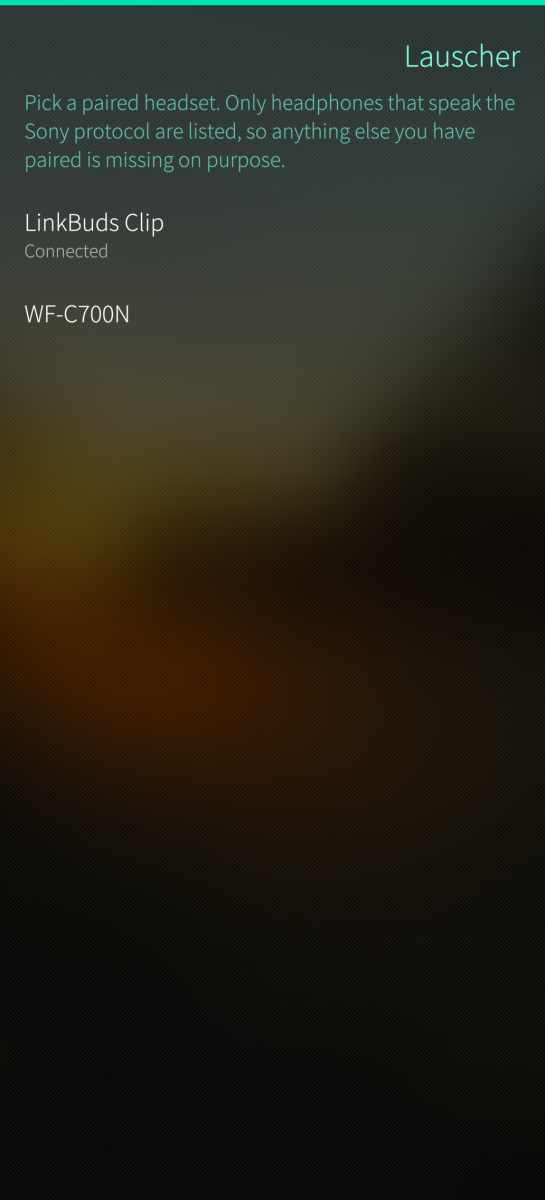
- Connect. Lists the paired devices that speak MDR, and only those; phones, speakers and car kits never appear. If exactly one supported headset is already connected when the app starts, it opens straight away.
- Reconnect by itself. Buds going into their case take the control channel with them, which is not a fault. The app waits, says what it is waiting for, and picks the session up when the headset comes back.
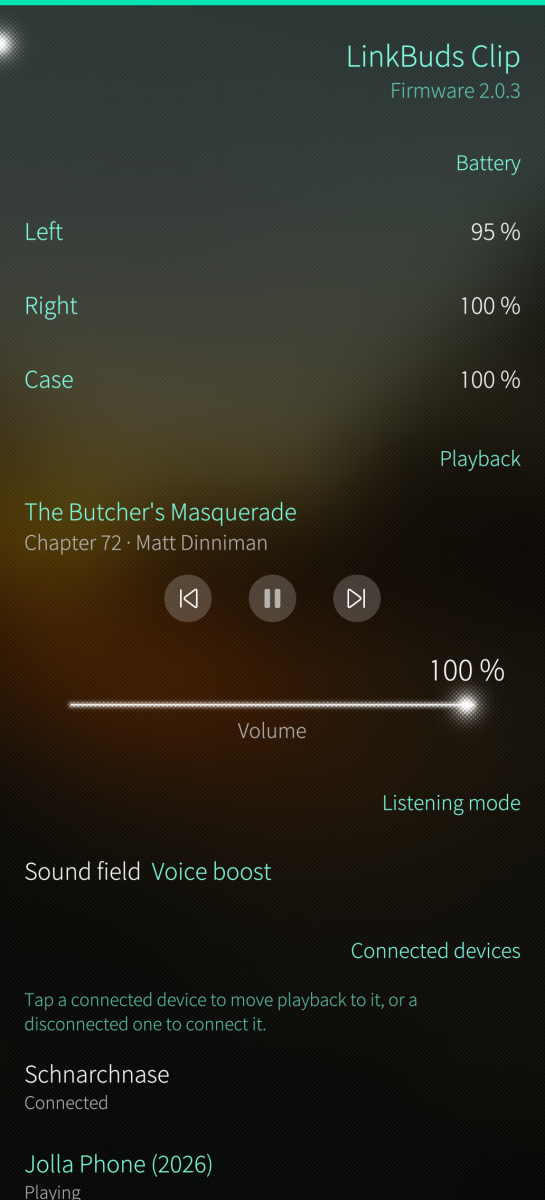
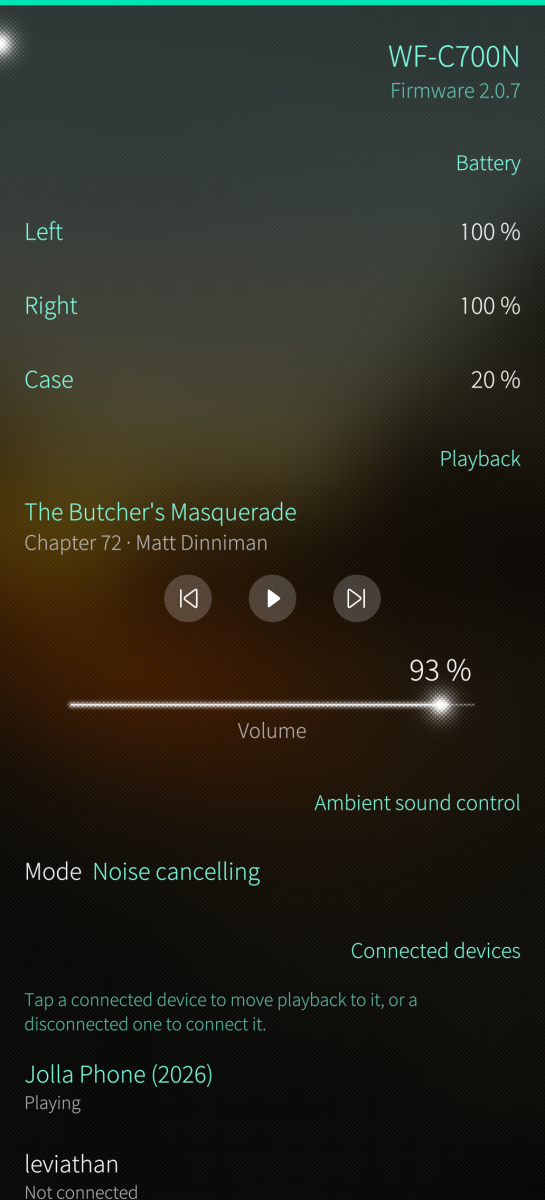
- Battery and identity. Per-side battery levels, model name, firmware, serial and the codec in use.
- Playback. Track names, play/pause, next and previous, and volume as a percentage.
- Ambient sound control. Off, noise cancelling, ambient sound with its level, and focus on voice.
- Listening modes. Standard, background music with its distance, cinema, voice boost and sound leakage reduction — whichever of them the device advertises.
- Equalizer. The presets the headset itself reports, the band steps as a strip of faders (five bands or ten, whichever the device has), and clear bass where it exists.
- DSEE. Sony's upscaling, under its own name — DSEE, DSEE HX, DSEE Ultimate — as the device reports it.
- Connected devices (multipoint). Which source devices the headset holds, which of them has playback, moving playback between them, and whether the headset may move it by itself.
- The headset's own settings. The booleans the device defines, multipoint among them, and what its Bluetooth link is tuned for: sound quality or connection stability.
- Cover page. Battery, volume and the active mode at a glance, with cover actions for the listening mode, the background music distance and the ambient sound control — whichever two of those the device has.
Lauscher shows only what your headset advertises. Two Sony models rarely offer the same set of features, so a section that is missing is one this device did not offer — the LinkBuds Clip, for instance, is open-ear and has no noise cancelling at all.
Before you start
Pair the headset in the Bluetooth settings first. Lauscher lists what is paired and speaks the Sony protocol, and connects on tap. If your headset is paired but missing from the list, connect it once in the Bluetooth settings so the phone reads its services again.
Only one app can hold the control channel at a time. Leaving the device page closes it on purpose, so Sony's own app — or another phone — can take over right away.
Devices
Developed and tested against the Sony LinkBuds Clip and the WF-C700N, on a Jolla Phone (2026). Other Sony headsets speaking the same protocol are expected to work, and the app shows whichever features they report. Community members report that devices like WH-1000XM4 and its generation is also working. Reports welcome!
Development
Please post bugs, errors and improvement suggestions as issues on GitHub: https://github.com/Wunderfitz/harbour-lauscher/issues
Interested people can also join our Telegram Group to exchange ideas, debug builds etc: https://t.me/+lLi7QF5RCC4xZDMy
Languages
English and German.
Credits and licence
The protocol is spoken by libmdr from the SonyHeadphonesClient project (MIT), formatting inside it uses fmt (MIT), and the Bluetooth connection is set up by BlueZ through the profile API bluetoothd already offers every app on the phone.
Lauscher is free software under the GNU GPLv3 or later. Sources: https://github.com/Wunderfitz/harbour-lauscher
Lauscher is an independent project. It is not affiliated with, endorsed or certified by Sony.
Lauscher was written together with Claude, Anthropic's AI assistant, in Claude Code.
Screenshots:
Category:
Keywords:
Application versions:
| Attachment | Size | Date |
|---|---|---|
 harbour-lauscher-0.1-1.aarch64.rpm harbour-lauscher-0.1-1.aarch64.rpm | 471.62 KB | 07/09/2026 - 00:19 |
| harbour-lauscher-0.2-1.aarch64.rpm | 484.74 KB | 12/09/2026 - 23:35 |
Changelog:
- Added an equalizer page: the presets the headset advertises, the band steps as
a strip of faders, and clear bass where the device has it. The button that
opens it names the preset that is on.
- Added a switch for DSEE, the headset's upscaling. It sits beside the equalizer
button because the headset takes both away on the same terms: while a
listening mode other than Standard is active, neither applies.
- Added a settings page for what the headset keeps about itself rather than
about the sound: the booleans it defines, multipoint among them, and what its
Bluetooth link is tuned for. Changing either drops the Bluetooth links for a
moment, which the page says before it happens.
- The app now reconnects by itself when a headset that went away comes back.
Buds going into their case are not a fault, so the app waits and says so
rather than reporting a failure, and picks the session up when they return.
- Launching with exactly one supported headset already connected now opens it
straight away. Two of them, or none, still open the picker.
- The cover can now switch the ambient sound control - off, noise cancelling,
ambient sound - which is the whole of what a closed-back headset offers there.
Before this the cover had no actions at all on a headset without listening
modes.
- The app now rotates into landscape.
- Fixed four faults on MDR version 1 headphones, WH-1000XM4 and older, reported
and diagnosed by JimKnopfIoT against that headset: voice guidance taking the
whole connection down, so that no such headset could connect at all; track
names never refreshing after the first; ambient sound being unreachable
because every mode read as noise cancelling; and the equalizer ignoring both
preset changes and band moves.
- Fixed a second headset being shown under the first one's name, which read as
the app connecting to the wrong one. Fixed the app accepting a Bluetooth
connection from a headset it had not asked for, and acting on a disconnection
meant for one it was not talking to.
- Fixed connecting to the same headset a second time hanging on "Connecting..."
for good. Leaving the device page closed this app's end of the control
channel, but BlueZ held the other end open, so the headset's one control
session stayed occupied; the app now tells BlueZ to let go of it.
- The new pages and controls are translated into German.
Comments
mive
Sat, 2026/09/19 - 15:33
Permalink
After realizing there is an update to 5.1 for fp4 I'm able to use the application. Everything is working great so far with WH-CH720N.
Thanks for allowing me to finally change some of the headphone settings :).
Only thing left, do you know if its possible to add a firmware update option? This would be great.
peperjohnny
Fri, 2026/09/18 - 21:02
Permalink
Works great with the WH1000XM5!
mive
Wed, 2026/09/16 - 17:50
Permalink
Ok. Thx. Maybe fp4 will get a 5.1 update in the future
mive
Wed, 2026/09/16 - 16:19
Permalink
Unable to install, error message:
Problem: nothing provides 'libc.so.6(GLIBC_2.34)(64bit)' needed
by the to be installed harbour-lauscher-0.2-1.aarch64
Solution 1: do not install harbour-lauscher-0.2-1.aarch64
Solution 2: break harbour-lauscher-0.2-1.aarch64 by ignoring s
ome of its dependencies
Fairphone 4, 5.0.0.72
WerkWolf
Wed, 2026/09/16 - 16:23
Permalink
This app will only work on SFOS >=5.1. The reason is that the runtime libraries on lower releases don't have full C++20 support, which is required for the foundation library: https://github.com/mos9527/SonyHeadphonesClient#for-developers The necessary GCC 13 came with SFOS 5.1, see https://forum.sailfishos.org/t/release-notes-pispala-5-1-0-11/29751 The missing libc is related...
starghost
Mon, 2026/09/14 - 21:20
Permalink
Awesome to see finally such a functional and elegant SailfishOS App for Sony Headphones. A huge 'thank you' to the developer(s) who made it possible. Tested with JP2. The WH-1000XM4 and WF-1000XM3 work both with the app. One difference noticed, the battery level is only shown for WH-1000XM4 but not for the WF-1000XM3. I guess there is a difference in the older V1 protokoll how the values coming from the devices are interpreted. The WH-1000XM4 has only 1 Batterylevel, while the WF-1000XM3 have 3 Battery levels (Left/Right/Chargingcase).
WerkWolf
Tue, 2026/09/15 - 00:50
Permalink
I actually don't know which details are supported and which not. And as I don't have any of the devices at home, it's hard to debug. If you want to help me to dig deeper, please consider downloading the desktop client and perform a capture of the initialization. See https://github.com/mos9527/SonyHeadphonesClient/tree/v1-compat/tests#cap... for details. With the data I can check out if some issue is still there that prevents us from getting all the data for the XM3.
Gepardi55
Mon, 2026/09/14 - 13:04
Permalink
Very nice surpise to have this app. And it works better than original app, immediately everything can be controlled etc.
ahjolinna
Sun, 2026/09/13 - 02:09
Permalink
I cant connect WH-1000XM3 I get: "unable to initialize MDR V1 (Timed out)
gdb logs just say this: https://paste.opensuse.org/pastes/5cdc3081b66a
WerkWolf
Tue, 2026/09/15 - 00:52
Permalink
This might be a temporary issue as I've received some positive responses on the XM3 already. Could you please try again, maybe after a restart of the device or the Bluetooth subsystem?
ahjolinna
Sun, 2026/09/13 - 02:01
Permalink
great too see this app, I never even though it was possible as I assumed it was 100% propriatery.
not a must thing, but it could be nice if this was moved into the settings app instead of standalone app.
when I tried DSEE on LinkBuds I didnt get any audio at first, but when I reconnected the device it worked, I would recommend adding a small info that reconnection might be needed when enabled
nthn
Wed, 2026/09/09 - 18:20
Permalink
This is really great to have, thank you. I'm looking forward to the new release for my XM4 headphones.
Matt
Tue, 2026/09/08 - 17:35
Permalink
My Sony WF-1000XM5 works fine otherwise, but even at maximum the volume via bluetooth is quite low.
edit: there was another volume control in Lauscher app, setting that to 100% solved that.
Jakub
Mon, 2026/09/07 - 20:58
Permalink
I double checked wf1000xm5. Everything works like a charm :)
maffo999
Mon, 2026/09/07 - 11:47
Permalink
Tested this with WF1000-XM4 but connection to the earbuds fails with:
[W] unknown:0 - [lauscher] "Validation failed: data.settingValue == PriorMode::CONNECTION_QUALITY_PRIOR [../../harbour-lauscher/libmdr/upstream/src/Generated/ProtocolV2T1Validation.cpp:470] (Malformed payload)"
If you want to reach me out directly on jolla forum (same username) I'll be happy to beta test it further with these earbuds
fingus
Mon, 2026/09/07 - 13:38
Permalink
Got the same Error like you on JP2026 on 5.2.0.17 with my WF-C700N. Have also WF-C500 and will test it later and report back here!
Thanks for this great app @WerkWolf, this was really missed very hardly!
I did file this error also on your Gitguh-page!
WerkWolf
Mon, 2026/09/07 - 15:02
Permalink
Oh wow, great to see that there is interest! However, really strange that the WF-C700N doesn't work on your side. I have the exact same model and it works like a charm. Maybe another firmware version?
@fingus @maffo999 Do you also have Telegram? IMHO a group there would be the easiest to exchange new builds and debug files for future improvements.
fingus
Mon, 2026/09/07 - 19:18
Permalink
With your new (experimental?) build on github it works now, see there. Works also with WF-C500.
WerkWolf
Tue, 2026/09/08 - 01:00
Permalink
Great! For the others, see the GitHub issue here: https://github.com/Wunderfitz/harbour-lauscher/issues/1#issuecomment-557... New release will come up soon if this build fixes the error for multiple people.
maffo999
Sat, 2026/09/12 - 18:42
Permalink
I've tried the nightly with WF-1000XM4 and the following seems to work ok:
1) connection to headset
2) battery level report (for each headset and case)
3) volume control
4) noise canceling/ambient sound setting
I still however have a minor issue where if I disconnect the headset from Lauscher, I need to completely kill the app for it to connect again. If I try to connect to the headset again without killing the app first, it will just try to connect and seemingly hang there.
Jakub
Mon, 2026/09/07 - 08:05
Permalink
This idea is great. I always wanted full controll of my headphones :D . I use "sony wf1000xm5". The app can connect to them and change audio, but switching ambient sound does not seem to work, or if if does, I cannot hear a difference. I can also test "sony 1000x the collection" when I get home.