
Meliona


Meliona — J2ME Emulator for Sailfish OS
A native Sailfish OS application that runs classic Java J2ME games on your phone.
Reset: To reset the application, navigate to the bottom of the About page.
Note: Version 0.5 can be regarded as the first official release. Therefore, you'd better reset the application and restart it to get the latest database support. As for your game progress, you may back it up first and restore it after the restart.
source code: https://gitee.com/yun_gitee/harbour-meliona
Game Box Skin: The app does not need Game Box Skin to run. If required, locate /assets_original/game_box in the project source code, pack it into a ZIP and import it via the app. Only a small number of Game Box Skins are included, and you can create custom ones.
Requirements
- Sailfish OS 5.0
-
Java 11(U can install java by installing meliona-jre in storeman,if it doesn't work,u can install Java yourself following the instructions below)
- aarch:OpenJDK11U-jdk_aarch64_linux_hotspot_11.0.20_8.tar.gz(e.g., Redmi K20)
- i486:zulu11.88.17-ca-jdk11.0.31-linux_i686.tar.gz(e.g., Mipad2,but this is the 32-bit x86 build — for 64-bit x86 devices you will need the x86_64 package instead)
- armv7hl:I don't have an armv7hl device and can't run tests on it, so I'm unable to provide examples.
Known Issues
- Some features may not run correctly on Sailfish OS 5.0+
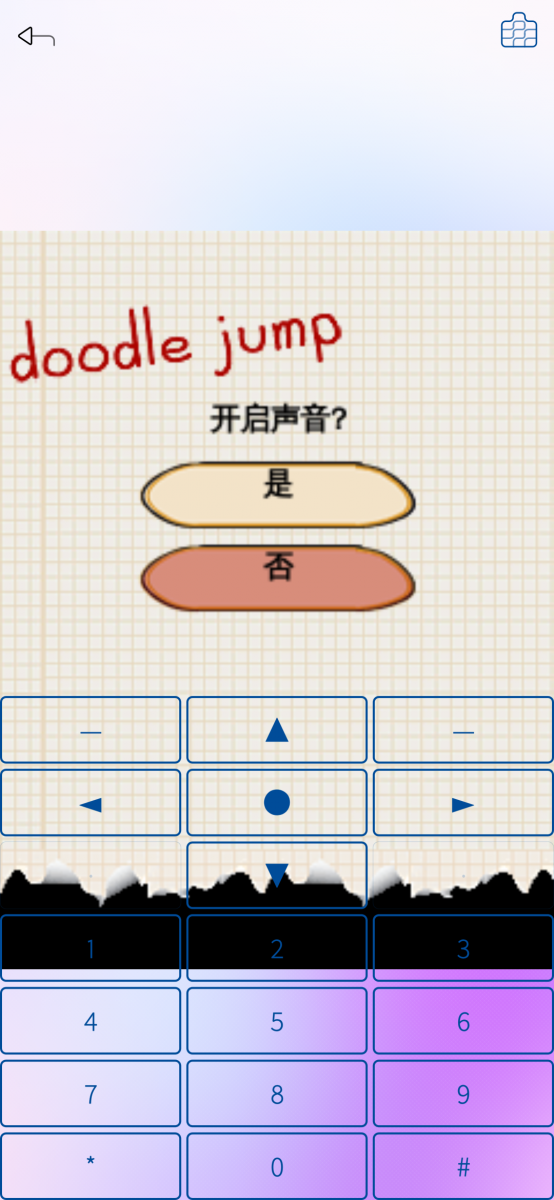
Screenshots:


Category:
Application versions:

Changelog:
0.5
- 新增游戏进度备份与恢复(Added game progress backup and restore)
- 支持修改游戏分辨率(Added support for changing game resolution)
- 应用默认使用英文(Application language defaults to English)
- 程序优化与问题修复(Performance improvements and bug fixes)
0.4
- 新增虚拟摇杆操控,支持摇杆/按钮编辑、拖拽、缩放与删除(Added virtual joystick input mode with editable widgets (joystick, button))
- 程序优化与问题修复(Performance improvements and bug fixes)
0.3
- 实现游戏声音(Game audio support)
- 新增虚拟按键,支持全屏模式下实体按键操控(Added virtual keypad for fullscreen mode)
- 引入中/英/德/法/西/日/俄七语言系统(Added multi-language support (zh/en/de/fr/es/ja/ru))
- 新增文字增强与画面平滑开关,字号与抗锯齿可调(Added text enhancement and smooth scaling toggles)
- 新增分辨率管理、假短信连接、游戏异常退出通知(Added resolution manager, fake SMS, crash toast)
- 调整UI布局,优化竖屏/横屏虚拟键盘体验(UI layout improvements with better portrait/landscape keypad)
- 程序优化与问题修复(Performance improvements and bug fixes)
0.2
- Support gamebox import (add/edit/delete custom phone shells)
- Support per-game orientation (portrait / landscape-left / landscape-right)
- Support display modes (original ratio / fit screen / skin fullscreen)
- Support touchscreen input for J2ME pointer events (press/drag/release)
- This update involves database modifications. Please reset the application.
0.1
- Add armv7hl & i486 build targets (no corresponding test hardware available temporarily)
- Reduce application size by removing partial default Game box resources
- Game import with JAR manifest parsing and icon extraction
- Hitmap-based game box skin system with per-key highlight masks
- Stdio-based frame streaming from Java to QML
- Game box (simulator skin) management with resolution filtering
- Play config persistence (keyboard type, window mode, bound skin)
- Splash-screen JDK detection and preference-based override
- About page reading RPM spec metadata at runtime
Comments
windes
Thu, 2026/07/30 - 13:13
Permalink
If reset app - all jar games progress will be erased?
yun_L
Thu, 2026/07/30 - 16:58
Permalink
yes,this is because i changed the database structure.Starting from the next version ,i will try to avoid this problem
windes
Fri, 2026/07/31 - 12:55
Permalink
Got it. Thanks, yea, that really hurts, if progress is erased and can't copy it somwhere and return back.
I wish a very success in sound in games (music+sfx), waiting it much. All other features are good enough, most critical are sounds now.
yun_L
Fri, 2026/07/31 - 15:36
Permalink
Thanks for your feedback. The game audio issues will be gradually addressed in future updates. If possible, you can send the game you are playing to me via email to facilitate testing.
windes
Mon, 2026/07/13 - 10:55
Permalink
[defaultuser@XperiaXA2 ~]$ JAVA_HOME=/home/defau ltuser/java harbour-meliona [D] unknown:0 - Using Wayland-EGL [D] unknown:0 - [DatabaseConnection] 数据库路径: "/ho me/defaultuser/.config/com.unapp/harbour-Meliona /db/meliona_info.db" [D] unknown:0 - [ApplicationCore::getAppConfigVa lue] 查询应用设置值,( "APP_SETTING" , "ORIENTATION" , Q Variant(int, 0) ) [D] unknown:0 - [ApplicationCore::getAppConfigVa lue] 查询应用设置值,( "APP_SETTING" , "ORIENTATION" , Q Variant(int, 0) ) [D] unknown:0 - [ApplicationCore::setAppConfigVa lue] 存储应用设置值,( "STORE_SETTING" , "DATA_PATH" , Q Variant(QString, "/home/defaultuser/.local/share /com.unapp/harbour-Meliona") ) [D] unknown:0 - [ApplicationCore::setAppConfigVa lue] 存储应用设置值,( "STORE_SETTING" , "CONFIG_PATH" , QVariant(QString, "/home/defaultuser/.config/co m.unapp/harbour-Meliona") ) [D] unknown:0 - [ApplicationCore::getAppConfigVa lue] 查询应用设置值,( "APP_SETTING" , "JDK_PATH" , QVar iant(QString, "") ) [D] unknown:0 - [ApplicationCore::setAppConfigVa lue] 存储应用设置值,( "APP_SETTING" , "FLASH_HOME" , QV ariant(bool, true) ) [D] unknown:0 - [ApplicationCore::getAppConfigVa lue] 查询应用设置值,( "APP_SETTING" , "FLASH_HOME" , QV ariant(bool, false) ) [D] unknown:0 - [ApplicationCore::getGameList] 查 询游戏列表 [D] unknown:0 - [ApplicationCore::getGameList] 日 志目录 "/home/defaultuser/.local/share/com.unapp/ha rbour-Meliona/harbour-meliona-debug.log" [D] unknown:0 - [ApplicationCore::setAppConfigVa lue] 存储应用设置值,( "APP_SETTING" , "FLASH_HOME" , QV ariant(bool, false) ) [D] unknown:0 - 根据主键查询成功: "GameInfo{du='4a4e0b5a 140a5fb71e6e371059966000', name='Sonic Advance' aultuser/java/bin/java"
[D] unknown:0 - startGame: gamePath = "/home/def
aultuser/.local/share/com.unapp/harbour-Meliona/
4a4e0b5a140a5fb71e6e371059966000/1553_sonic_adva
nce_r.jar"
[D] unknown:0 - startGame: workDir = "/home/def
aultuser/.local/share/com.unapp/harbour-Meliona/
4a4e0b5a140a5fb71e6e371059966000"
[W] unknown:0 - startGame: 进程启动失败: "Permission d
enied"
[D] unknown:0 - SkinManager: generated 31 highli
ghts
[D] unknown:0 - 根据主键查询成功: "GameInfo{du='4a4e0b5a
140a5fb71e6e371059966000', name='Sonic Advance',
iconPath='/home/defaultuser/.local/share/com.un
app/harbour-Meliona/4a4e0b5a140a5fb71e6e37105996
6000/icon.png', gamePath='/home/defaultuser/.loc
al/share/com.unapp/harbour-Meliona/4a4e0b5a140a5
fb71e6e371059966000/1553_sonic_advance_r.jar', g
ameFormat='jar', gameSize=644469, dataDir='/home
/defaultuser/.local/share/com.unapp/harbour-Meli
ona/4a4e0b5a140a5fb71e6e371059966000', vendor='G
ameloft SA', version='1.4.0', createTime='2026-0
7-13 10:34:44', updateTime='2026-07-13 10:34:44'
, screenWidth=0, screenHeight=0, encoding='UTF-8
', remark='CLDC:CLDC-1.0, MIDP:MIDP-2.0'}"
[D] onCompleted:88 - [分辨率] 来源: 游戏盒子, 原始: 240 x 3
20
[D] computeLayout:223 - ========== 布局计算 ========
==
[D] computeLayout:224 - [容器] 宽: 1080 高: 192
0
[D] computeLayout:225 - [机壳] 原生: 1440 x 2560
显示: 1080.0 x 1920.0 偏移:( 0.0 , 0.0 ) 旋转: 0 °
宽高互换: false
[D] computeLayout:229 - [屏幕开孔] 大小: 542.3 x 726.0
起点:( 273.0 , 181.5 ) 终点:( 815.3 , 907.5 )
[D] computeLayout:232 - [游戏画面] 原生: 240 x 320 显示
: 480 x 640 起点:( 304.1 , 224.5 ) 终点:( 784.1 ,
864.5 )
[D] computeLayout:237 - [缩放] 显示模式: 2 自适应比:
2.259 整数倍: 2
[D] computeLayout:240 - ========================
======
Log of starting Meliona with Sonic.jar 240x320. Black screen. Underlined string is also on Sandboxing=Disabled. What permission is denied?..
windes
Tue, 2026/06/02 - 10:59
Permalink
Still not appear for armv7hl.
yun_L
Tue, 2026/06/02 - 11:33
Permalink
Could you clarify whether the problem is that the package cannot be installed or that the armv7hl package cannot be found? If the package cannot be found, you can directly visit OpenRepos.net, where I uploaded it. However, I am not sure how storeman identifies different versions.
birdzhang
Tue, 2026/06/02 - 08:44
Permalink
哈哈,好玩。
另外,只能竖屏吗?像植物大战僵尸是横屏的, 玩起来有点显示不全。可以下载 https://java.zixing.fun/java/jar/pvz.jar 测试一下。
yun_L
Tue, 2026/06/02 - 10:42
Permalink
是的,目前仅仅支持竖屏。更多分辨率与屏幕模式,将会在新的版本中得到支持
windes
Mon, 2026/06/01 - 21:23
Permalink
Thanks! Waiting for armv7hl so much!
yun_L
Tue, 2026/06/02 - 03:14
Permalink
The armv7hl build is ready now, feel free to give it a try.
windes
Mon, 2026/07/13 - 10:38
Permalink
Cool! Loaded, tryed. How to install java environment on armv7hl, could you explain?
I loaded zulu11.86.21-ca-jdk11.0.30-linux_aarch32hf.tar file. But what to do with it, how to install?
Copied all unpacked folders to filesystem, tried to select JDK11 folder - but it is possible to select only file, not folder! Tried select /bin/java file, /Welcome.html - not works. What to do?
Launched with command:
JAVA_HOME=/home/defaultuser/java harbour-meliona
Selected from Settings jdk11 file as /java/release
Now jar started and show phone skin (Nokia 6300 or Nintendo pocket). Tried 4 different jars - always black screen inside skin's display. What need else?..
And would you please make Meliona on english please? Very hard to understand interface.
yun_L
Wed, 2026/07/15 - 20:59
Permalink
Sorry I missed your comment earlier. You will need to install Java 11 for the armv7hl architecture on your device. However, I’m not certain whether such a build actually exists. Without a physical device matching this specification, I’m unable to carry out relevant testing myself.
As for the installation process, you can search online for guides on installing and verifying Java on a Linux system.
Regarding English language support for the app, this feature will be implemented in an upcoming new release.
windes
Fri, 2026/07/17 - 08:33
Permalink
Look at my log of launching .jar file upper, please. Why black screen? Why permission denied?
yun_L
Fri, 2026/07/17 - 10:20
Permalink
Has your JDK 11 started working properly? You can run java -version in the terminal to verify it. I suspect the wrong Java build is installed. You need to download Java 11 for the armv7hl architecture, but I only offer builds for aarch64 and i486, not armv7hl. You may look up solutions with the help of AI tools.
In short, download the correct Java 11 distribution, extract it to your device, then manually specify the binary path: java path/bin/java .
windes
Mon, 2026/07/20 - 10:08
Permalink
I loaded zulu11.86.21-ca-jdk11.0.30-linux_aarch32hf.tar - is that right for armv7hl?
Or this is right:
https://github.com/AdoptOpenJDK/openjdk11-binaries/releases/download/jdk... ?
When i try to manually specify path to java folder from app - it can select only file, NOT folder, so i cant select /defaultuser/java, only /defaultuser/java/bin/java file - but this is not right path.
Tried to manually specify path via app and via appSettings.conf file to:
1. /usr/bin/java
2. /usr/bin/java/bin/
3. /usr/bin/java/bin/java
nevermind, log of app in terminal says: "[JDK check] path: wrong path exists=" true file= true exec= true
Unpacked java folders (/bin, /conf, /include, /jmodes, /legal, /lib, /man and release file to /usr/bin/java)
windes
Mon, 2026/07/20 - 11:16
Permalink
AAA! I need to create symbol link for working java!
ln -svf /home/defaultuser/java/bin/java /usr/bin/java
and then change permission of /home/defaultuser/java/bin/java file to execute.
Then Meliona starts to work on armv7hl! :-)
So, something wrong with resolution of jar now. I loaded 240x320 jar game (Plants vs Zombies), import it, launch - but it shows in soooo little window, that i even cant see letters there. Trying to change scale - "On dimension of screen" option - not works, same little scale.
Also, loaded 480x800 jar game, no preset of console for it, but can add it. Trying to add - need to choose covers for it and keyboard layout file! Where to got them? Can you set them same as in 240x320 preset?
yun_L
Mon, 2026/07/20 - 11:52
Permalink
Congratulations on successfully running this software on your device. Here are answers to your two questions:
Question 1
The issue is likely caused by one of two factors:
First, the game’s native resolution is not actually 240×320. I also own a copy of Plants vs. Zombies, whose true resolution is 360×640 instead.
Second, have you reset the app? I made changes to the database during the last update. The reset option is located at the bottom of the About page.
Question 2
Are you referring to physical device skins? There is no built-in way to fetch extra ones, as I only created skins for five or six device models, with just two retained inside the app to minimize installation size.
To add new skins, you will need to create them yourself using Photoshop; this feature was originally designed for user customization. I plan to improve the import function when I have spare time, and release an archive package at my project’s source code repository so users can import additional skins.
windes
Mon, 2026/07/20 - 13:55
Permalink
Thanks, man! Resseting app really helps! Now game is showing right, in resolution of 240x320, that i specially downloaded for test.
You create skins for 5-6 devices, but i see in app only 2 - Nokia 6300 and Nintendo console.
No need for skins, really, better is make navigation with sensor - now it is not working. With buttons - work.. But kinda strange buttons actions, and they are filling all screen, covering a graphics - that a bad way.
yun_L
Mon, 2026/07/20 - 14:31
Permalink
Which sensor are you referring to? The touchscreen? If so, touch input is actually supported. The current design logic only allows one type of touch operation to be active at a time. While in-game, tap the upper-right corner to hide the on-screen buttons, which will re-enable direct touchscreen control.
I understand the overlay buttons cover most of the game view, but this is a current limitation. More user-friendly control schemes will be added in future updates. For instance, my unreleased build already has gamepad support. Virtual joysticks and physical keyboard input may also be implemented later. Thanks for your feedback.
windes
Mon, 2026/07/20 - 15:09
Permalink
Sure i tried that upper-corner icon and tried touch, not works, not even 1 touch.
yun_L
Mon, 2026/07/20 - 18:49
Permalink
Not all games natively support touch input. I’ve tested Plants vs. Zombies and it works perfectly with touch here. You can try a different game for comparison. Alternatively, install the same game on an Android device to check whether its original build supports touchscreen controls.
windes
Tue, 2026/07/21 - 07:46
Permalink
i had tested touch on PvZ too! But not works. What version of PvZ you have?
yun_L
Tue, 2026/07/21 - 08:51
Permalink
I can no longer recall where I downloaded this game, but it is most likely a modified build since it only supports Chinese. If you'd like, you can provide an email address, and I will send the file to your inbox.
roundedrectangle
Sun, 2026/05/31 - 22:15
Permalink
Hello! Where can I find the sources for your application, and will there be armv7hl and i486 versions of it?
yun_L
Mon, 2026/06/01 - 15:22
Permalink
Hello! The source code is available at: https://gitee.com/yun_gitee/meliona. I will release builds for armv7hl and i486 in the future.
Matias
Mon, 2026/06/01 - 23:24
Permalink
Hi, the repo appears to be private. I'm getting a 403 upon visiting.
yun_L
Tue, 2026/06/02 - 03:10
Permalink
try again
trial
Tue, 2026/06/02 - 02:33
Permalink
Me too.
yun_L
Tue, 2026/06/02 - 03:10
Permalink
try again