
System Ninja


Fully coded, built, deployed, and packaged into an RPM entirely from inside a Sony Xperia XA2 running Sailfish OS. No computer. No IDE. No SDK. Just a terminal, a text editor, and pure determination.
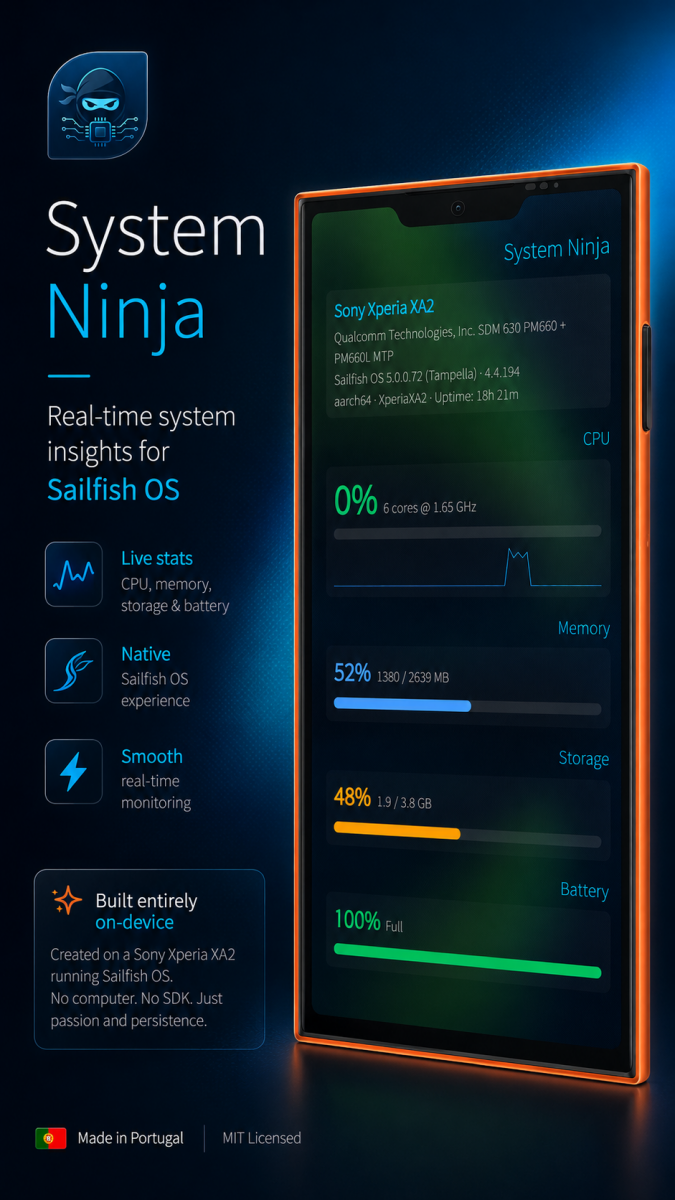
System Ninja is a native system monitor built for Sailfish OS. It delivers real-time hardware insights with a visually stunning, buttery-smooth interface that feels right at home on your Sailfish device.
What makes it stand out:
• Live CPU tracking with per-second updates, animated progress bars, and a beautiful sparkline graph that visualizes your processor history over time.
• Memory monitoring that shows exactly how much RAM is in use, with smooth color-coded bars that adapt to your usage levels.
• Storage overview so you always know how much space you have left before hitting the wall.
• Battery intelligence with real-time capacity, charging status, and temperature readouts.
• Network speed monitor tracking live download and upload speeds with dynamic activity visualization.
• Thermal monitoring pulling sensor data directly from your device to show accurate CPU temperatures.
• Load average at a glance - 1m, 5m, 15m system load stats.
• Top processes ranked by real-time CPU and memory usage, giving you instant visibility into what is consuming your system resources.
Design & UX:
Every pixel was crafted for Sailfish OS. The app uses native Silica components, smooth SmoothedAnimations on every progress bar, color-coded warning s that shift from green to amber to red as usage climbs, and a polished cover page that shows your CPU, RAM, and battery at a glance - complete with a one-tap refresh action. The layout is clean, information-dense, and instantly readable.
Cover action:
Swipe to the app cover on your home screen and see live CPU percentage with a colored progress bar, plus RAM and battery stats - all updating automa tically. Tap the refresh icon to pull fresh data on demand.
Technical:
Built with QML and Python via PyOtherSide, System Ninja reads directly from native Linux interfaces - /proc, /sys, and thermal zones - delivering ac curate, low-overhead system stats without relying on third-party libraries or bloated frameworks. It is fast, lightweight, and respects your battery.
MIT Licensed.
Github: https://github.com/Andrew21P/system-ninja/
Made in Portugal.
Screenshots:
Category:
Keywords:
Application versions:
| Attachment | Size | Date |
|---|---|---|
 system-ninja-1.0.0-1.noarch.rpm system-ninja-1.0.0-1.noarch.rpm | 199.9 KB | 15/05/2026 - 16:59 |
| system-ninja-1.0.1-1.noarch.rpm | 200.58 KB | 15/05/2026 - 23:27 |
Changelog:
(none)
Comments
RootGPT
Sun, 2026/05/17 - 14:41
Permalink
There's not User Data and Micro SD Data. And you can add Swap Data and ZRAM Data? However good app!!!
Markkyboy
Sun, 2026/05/17 - 11:19
Permalink
Tapping the launcher icon when the app is already running, starts another instance of the app, but it never opens.
This should not happen, instead the app should be brought to the foreground.
trial
Sun, 2026/05/17 - 04:25
Permalink
Awesome app! Something useful @last!
frankps
Sat, 2026/05/16 - 15:40
Permalink
Seems to work fine on my Fairphone 5 with SFOS 5.0.0.77.
Kuba
Sat, 2026/05/16 - 15:12
Permalink
the best native system monitor for sfos
eson
Sun, 2026/05/17 - 10:59
Permalink
What did you compare to?
davodego
Fri, 2026/05/15 - 23:08
Permalink
It dosn't start on xperia 10 III SFOS 5.0.0.77
line 4: qmlscene: not found
CitymanDev
Fri, 2026/05/15 - 23:30
Permalink
Hey Davo! sorry for the Hassle, is the first app I develop for SFOS, and I only tested directly on the XA2 where I already got the dependencies before, I already fixed it hopefully and should now include those missing dependencies to the RPM. Do you mind trying again with the new rpm? Thanks! system-ninja-1.0.1-1.noarch.rpm
davodego
Sat, 2026/05/16 - 00:16
Permalink
Thanks, it's now up and running and working perfectly.
A really lovely app!
eson
Fri, 2026/05/15 - 21:19
Permalink
Wow... sounds fantastic, but can we see the source code?
CitymanDev
Fri, 2026/05/15 - 22:15
Permalink
Hey Eson, I just added the gh link to the description. Thanks for letting me know.