
Felis Netatmo


Felis Netatmo
A small, native Netatmo weather-station viewer for Sailfish OS.
Current measurements, a readable cover, and nothing you do not need.
Features
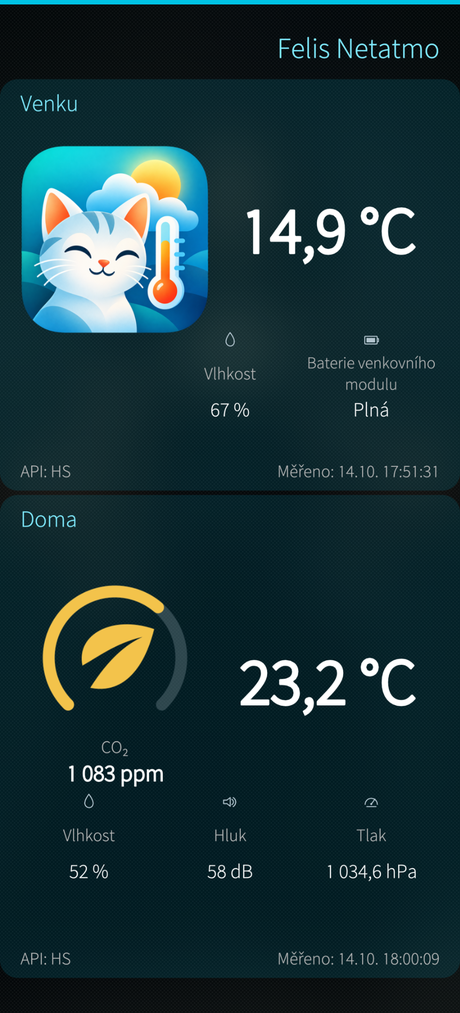
- Outside first: outdoor temperature, relative humidity and outdoor-module battery status, with the Felis cat artwork.
- Inside: temperature, humidity, CO₂, sound level and air pressure.
- CO₂ air-quality dial: a coloured arc and leaf, with the actual ppm reading below.
- Live measurements: prefer Netatmo's homestatus API (HS), with getstationsdata (GST) as a fallback. The source and sensor measurement time (to the second) are shown on each panel.
- Refresh: pull down on the main page or use the cover action for a manual refresh; automatic refresh is adjustable from 1 to 60 minutes (default 5 minutes) while the app is running, including in cover mode.
- Offline behaviour: retain the last valid values and their source if fetching fails; indicate the error without confusing it with a dangerous CO₂ reading. Show placeholders if nothing has been received yet.
- Sailfish-native interface: Silica, system Ambience background, an app cover with both temperatures, responsive layout and scroll fallback on smaller screens.
- English as the source/fallback language, Czech translation. No graphs, history or independent background service.
Supported equipment
Intentionally limited: one main indoor Netatmo station (NAMain) and one outdoor module (NAModule1).
Only the first station returned by the account and its first NAModule1 are used. Multiple stations, additional indoor modules, rain gauges and wind gauges are not displayed. This release was developed and tested with the one-indoor/one-outdoor setup only.
The cat illustration is decorative. It does not indicate actual cloud, rain or sunshine conditions.
Set up Netatmo access
Each user supplies credentials for their own Netatmo developer application; nothing is compiled into the source code or RPM.
- Create an app at Netatmo Connect.
- Use the developer portal's token generator with the read_station permission to obtain a refresh token.
- Open Felis Netatmo → Settings and enter Client ID, Client Secret and Refresh Token, then save.
- Let the first request finish. After an initial getstationsdata request discovers the home's ID, Felis Netatmo normally uses homestatus for fresher readings.
OAuth2 access tokens are renewed automatically. Netatmo can rotate refresh tokens during renewal; the app stores the latest token. When changing only the refresh interval, leave the secret/token fields empty to keep the saved credentials.
Before credentials are configured, a clearly marked Demo data mode is available. That action is hidden once credentials are saved, to avoid mistaking demo values for actual readings.
Source code
GitHub: MiPal666/FelisNetatmo
License
GPL-3.0-or-later
Tested on Jolla Phone 2026 / Sailfish OS 5.2.0.20
Screenshots:
Category:
Keywords:
Application versions:
| Attachment | Size | Date |
|---|---|---|
 harbour-felisnetatmo-0.1.0-15.aarch64.rpm harbour-felisnetatmo-0.1.0-15.aarch64.rpm | 445.44 KB | 15/10/2026 - 00:24 |
Changelog:
0.1.0
- Initial public release
Recent comments