
Speaker Gain


The alarm rings at full volume and Bluetooth headphones start louder than they should. Neither has a control anywhere. This sets both, and the setting stays.
THE PROBLEM
The alarm has a loudness of its own, and none of the controls reach it: not the ringtone slider, not the volume keys, not switching to Silent. That last one is deliberate - an alarm is meant to wake you - but the rest is not. The feedback daemon gives the alarm its own volume entry and binds it to a stored setting of the general profile, whichever profile is actually active. The system ships that setting at full volume and no part of the interface ever writes it. Lowering the ringtone does nothing, which is the mistake almost everyone makes first.
Verified on a Jolla Phone (2026), a Sony Xperia 10 III and a Gemini PDA - the configuration files are identical on all three, so this is how the platform behaves and not a fault of one device.
WHAT IT DOES
- Alarm volume, 0-100, written through the same interface the system uses itself and read back afterwards rather than assumed. A button puts the shipped value back.
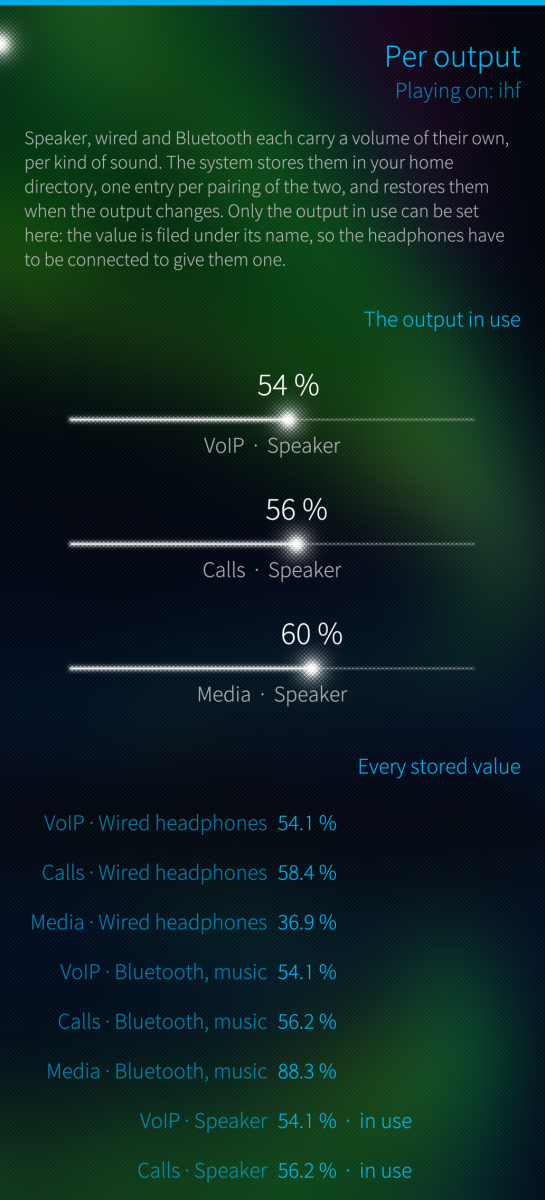
- Volume per output: speaker, wired, Bluetooth for music and Bluetooth for calls each carry a volume of their own, per kind of sound, and the system restores them when the output changes. Only the output in use can be set, because that is how the value is filed - the headphones have to be connected to give them one.
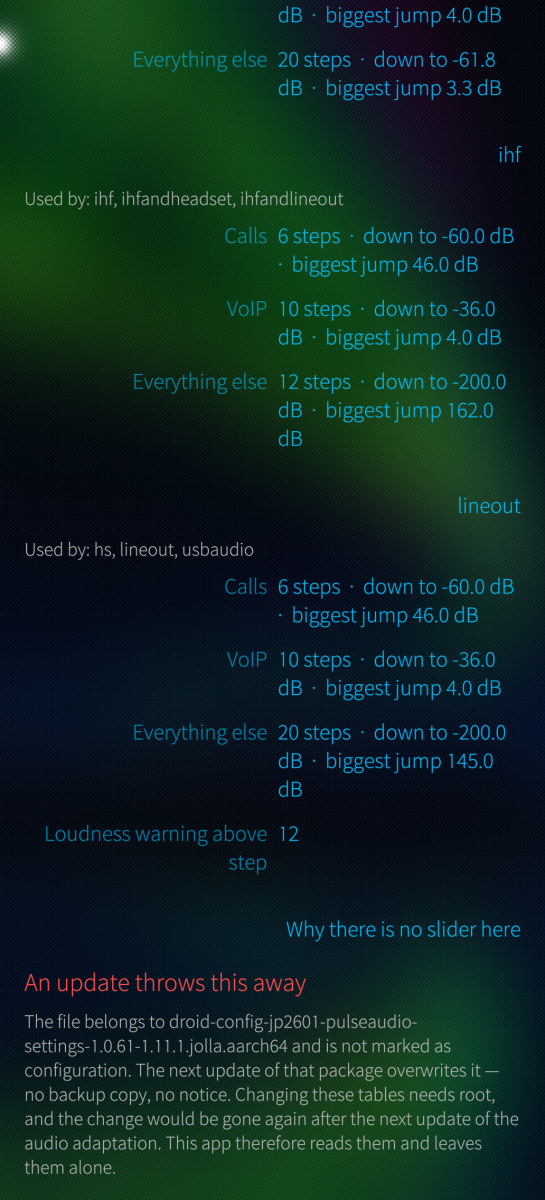
- Volume steps per output, read only: the volume keys do not move a percentage, they walk a list of fixed levels, and each output has lists of its own. The page shows how many levels there are, how far down they reach, and the widest gap between two of them - what one press costs at its coarsest point.
- Will it survive? Every value says where it is stored and what a system update does to it, worked out from the package database at runtime. A value in your own home directory is kept; a file belonging to a package and not marked as configuration is replaced without a backup and without a notice.
WHY BLUETOOTH HEADPHONES START TOO LOUD
The phone does not turn Bluetooth sound down. It turns the headphones down - and it starts by turning them all the way up.
Bluetooth carries a remote-control protocol, AVRCP, and part of it is absolute volume: the phone tells the headphones which volume to run at, on a scale of 0 to 127. Sailfish uses it (avrcp_absolute_volume=1), and with that switch on PulseAudio stops attenuating the audio itself. The sink for the headphones then reads 100 % / 0.00 dB - and that figure is not a description of anything happening on the phone, it is what is being sent to the headphones. Their own volume control is now wherever the phone put it, which is the top. Whatever you had set on them before pairing is gone.
Everything that makes the sound quieter has to happen one layer up, in the volume of the audio stream. And an output that has never played before has no stored value, so the system takes a fixed figure from its own table: 25 dB below unity for media, 15 dB for calls.
Two things follow. That table knows nothing about the headphones attached - a sensitive in-ear and an insensitive over-ear get the same 25 dB against a receiver that is wide open, and whether that lands pleasant or painful is luck. And a call starts ten decibels louder than music, into headphones at maximum; ten decibels is roughly twice as loud.
None of this is a fault in the headphones or the driver. It is a design decision - let the headphones do the attenuating, which is the better place for it - plus a fallback figure that had to be chosen without knowing what would be connected. What is missing is a way to correct that figure once per pair of headphones. That is what this app adds.
The fix is one slider: connect the headphones, play something, open Volume per output, lower "Media - Bluetooth, music". It stays. The value lives in your home directory, the phone restores it whenever those headphones come back, and a system update does not touch it. Calls carry their own value on the same output and start ten decibels ahead.
HOW IT WORKS
No root, no system file touched. The alarm volume is one stored number in your own settings. The per-output volumes are written the way the platform writes them itself: a stream carrying that kind of sound is opened, its volume is set, and the audio system files it under the output in use. No sample is ever played through that stream, so nothing is heard.
STATUS
Version 0.1.0, shared as is, no warranty (GPLv3). The alarm slider is verified on all three devices above. The per-output part is verified on the Jolla Phone (2026) and the Xperia 10 III.
ARCHITECTURES
aarch64 (Sailfish OS 5.0+). An armv7hl build exists and installs, and the alarm slider works there, but the per-output part has not been tried on hardware.
AI assisted development.
Screenshots:


Category:
Keywords:
Application versions:
| Attachment | Size | Date |
|---|---|---|
 harbour-speakergain-0.2.1-1.aarch64.rpm harbour-speakergain-0.2.1-1.aarch64.rpm | 145.29 KB | 15/10/2026 - 20:37 |
| harbour-speakergain-0.2.1-1.armv7hl.rpm | 136.32 KB | 15/10/2026 - 20:37 |
Changelog:
- USB headphones whose volume control reports a dB scale the system cannot use now follow the volume. The Bose Noise Cancelling Wired Earbuds claim their control spans 25600 dB, PulseAudio believes it, and every setting moved them by a fraction of a dB: they stayed at full volume. The package brings a PulseAudio profile that keeps such a device's control at full scale and sets the volume in software, and a udev rule naming the devices known to need it. Others are offered on the outputs page; a helper with system rights, which a polkit rule lets the user start and nothing else, adds them. - About -> Diagnostics: a compact report of how the phone's sound is put together - route, sinks, streams, the volume controls of USB cards and what udev handed PulseAudio for them - with what looks wrong spelled out. Serial numbers, Bluetooth addresses and names, the host name and the apps playing are left out. Copy or save it; nothing is sent. Also on the terminal as harbour-speakergain --diagnostics.
Recent comments