
RooTelegram


[ENGLISH] RooTelegram — A lightweight and responsive Telegram client for SailfishOS
Prerequisite: SFOS 5.1
Telegram Group: https://t.me/+E7V-a7x4JbY1Njhk
RooTelegram is tested on:
- Sony Xperia 10 III (SFOS 5.1.0.11)
- Jolla C2 (SFOS 5.1.0.11)
This application was developed using artificial intelligence technologies, specifically Warp Terminal and Claude Code Opus, but Warp Terminal has been gradually phased out in favor of Claude Code. Therefore, if the use of an application generated via a large-scale language model (LLM) is not comfortable for the user, it is recommended to avoid its installation and use. It is specified that any negative comment regarding this circumstance will not only be ignored but will result in the immediate blocking of the user.
I hereby disclaim any and all responsibility for the application, its functionality, and any consequences arising from its use. By choosing to use this application, the user acknowledges and accepts that they do so entirely at their own risk, and agrees that the developer shall not be held liable for any damages, losses, or adverse effects—whether direct, indirect, incidental, or consequential—resulting from the use or misuse of the application.
Main features
- Simple, fast interface optimized for SailfishOS
- Full support for message formatting (bold, italic, monospace, etc.)
- Reliable notifications via a dedicated daemon
- Custom Emoji support
- Message PIN management
- Stickers support
- Group join request management (for admins)
- Modern UI + daemon architecture, for instant app startup
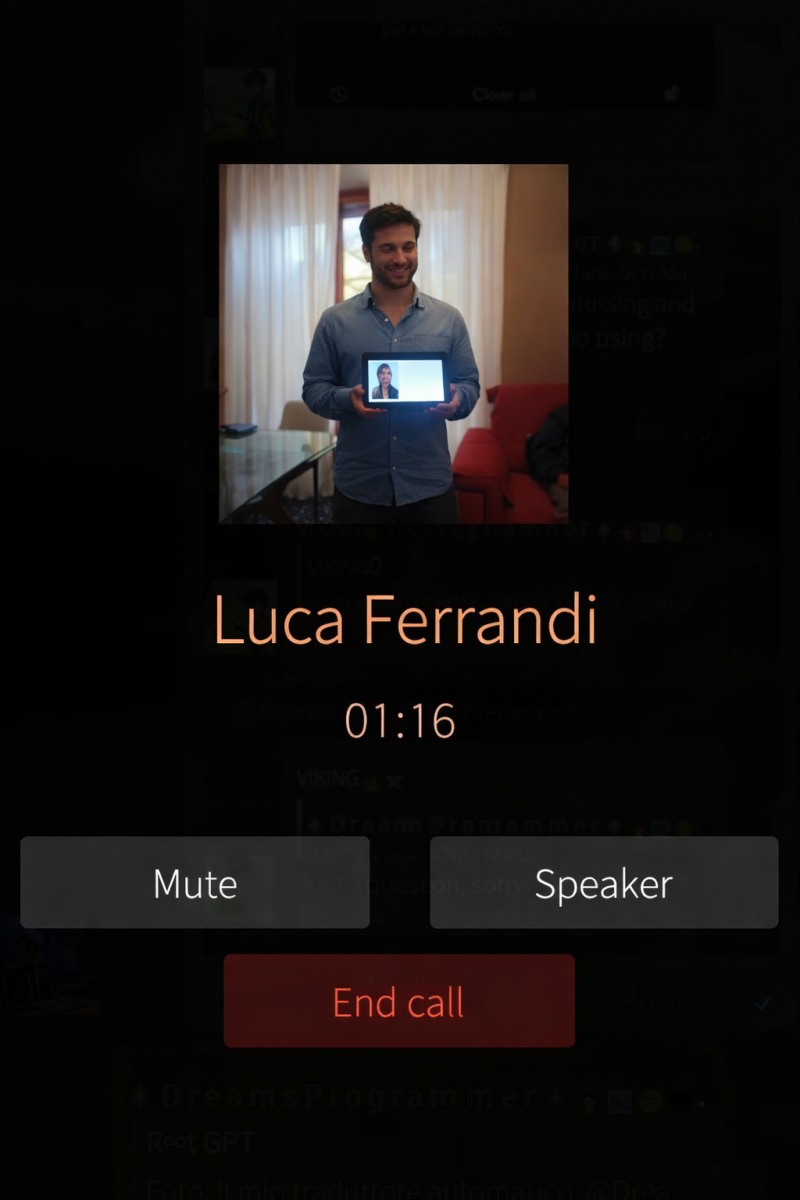
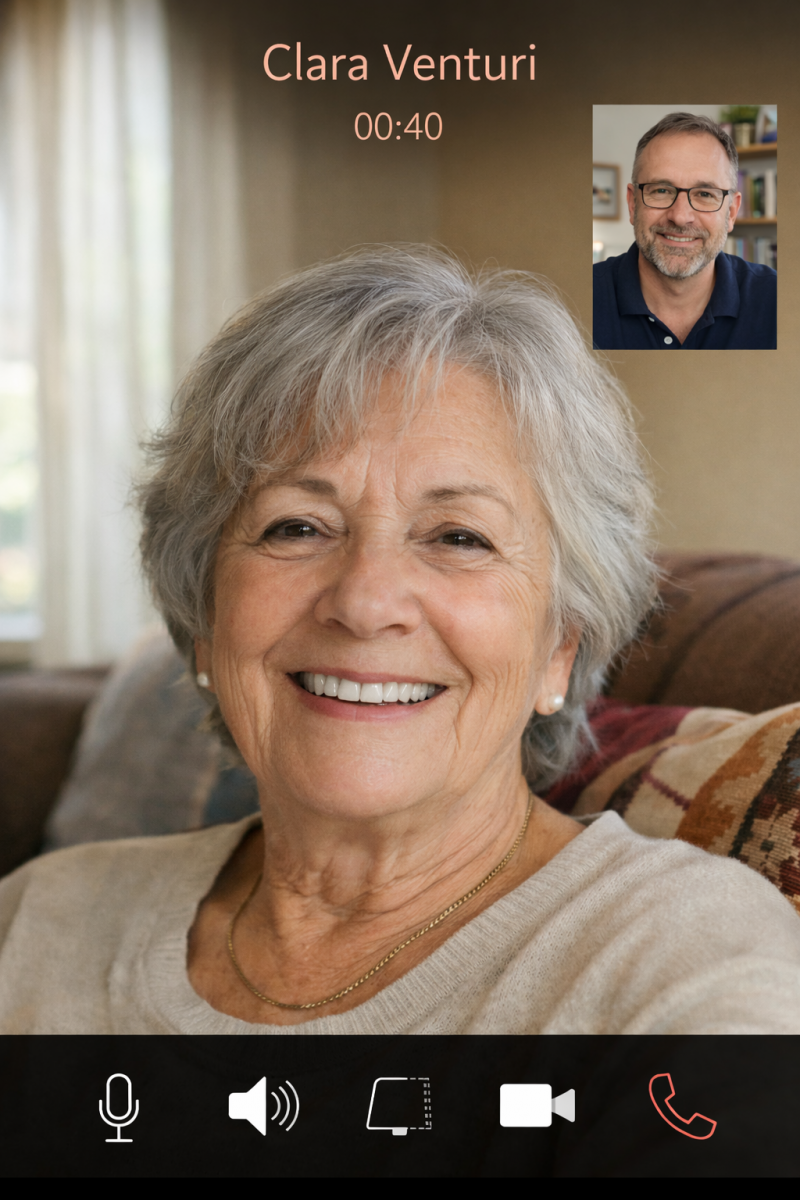
- Calls and Videocalls
Project origins
RooTelegram was born as an evolution and modernization of the original Telegram client for SailfishOS:
Fernschreiber by Sebastian J. Wolf and his collaborators: https://github.com/Wunderfitz/harbour-fernschreiber#contributions
and draws inspiration from some technical solutions of:
Yottagram by Michal Szczepaniak: https://github.com/Michal-Szczepaniak/Yottagram
Both projects served as a valuable starting point, but RooTelegram introduces a fully redesigned architecture, conceived to be faster, more stable, and better suited to modern devices.
Project goal
The goal of RooTelegram is to offer a Telegram client that is:
- responsive → instant startup thanks to the always-on daemon
- lightweight → minimal UI, no heavy effects
- reliable → notifications always working
- consistent with SailfishOS → native integration, respect for Silica guidelines
The design is intentionally bare and basic, because the priority is speed, not aesthetics.
Roadmap
Current development status (ROADMAP):
- Message editing (text formatting) — ✔️ DONE
- Working notifications — ✔️ DONE
- Notifications daemon — ✔️ DONE
- Folder creation and management — ✔️ DONE
- Custom emoji — ✔️ DONE
- Message PIN — ✔️ DONE
- Partial text selection + copy — ✔️ DONE
- Group join request management (admin) — ✔️ DONE
- Statuses / Stories — ✔️ DONE
- Formatting bugfixes — ✔️ DONE
- Message translation — ✔️ DONE
- Add "Send to RooTelegram" in the SailfishOS Share menu — ✔️ DONE
- Add "Call" for Telegram voice/video calls — ✔️ DONE
- Improve image previews (portrait and landscape), improve message formatting (word wrap and mono) and link previews — ✔️ DONE
- User bio and tabs (Media, Audio, Documents, Links, Groups) — ✔️ DONE
- Settings for Groups and Channels — ✔️ DONE
- Multilanguage version — English, German, Italian, Polish, Russian, French, Slovak.
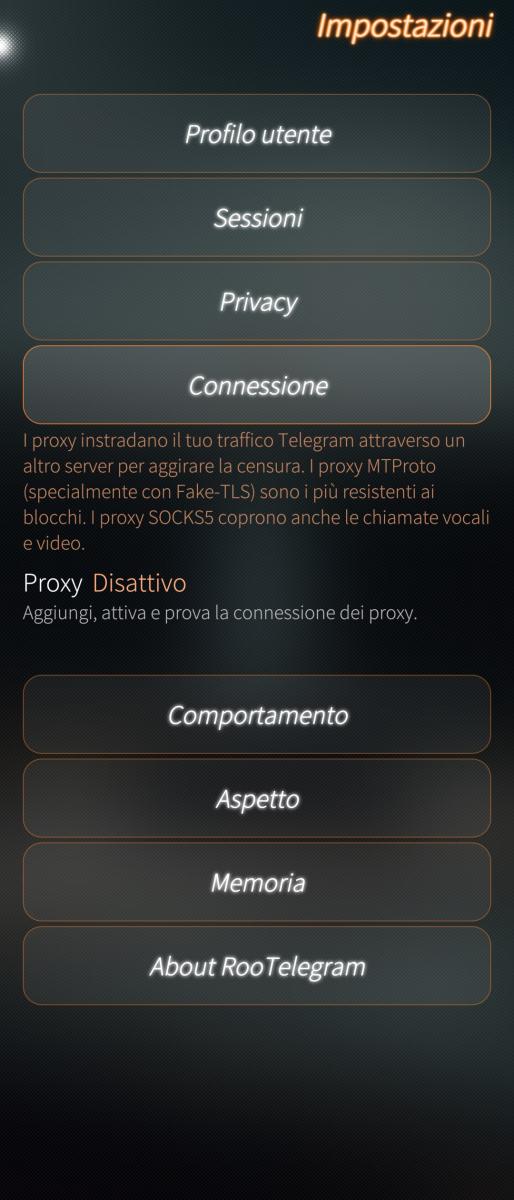
- Telegram Proxy — ✔️ DONE
Your support helps keep my projects alive! https://ko-fi.com/rootgpt
Telegram Group.
GitHub: https://github.com/RootGPT-YouTube/RooTelegram-SailfishOS
---
[ITALIANO] RooTelegram — Un client Telegram leggero e reattivo per SailfishOS
Requisiti: SFOS 5.1
Gruppo Telegram: https://t.me/+E7V-a7x4JbY1Njhk
RooTelegram è testato:
- Sony Xperia 10 III (SFOS 5.1.0.11)
- Jolla C2 (SFOS 5.1.0.11)
Questa applicazione è stata sviluppata utilizzando tecnologie di intelligenza artificiale, in particolare Warp Terminal e Claude Code Opus, ma Warp Terminal è stato abbandonato in favore di Claude Code. Pertanto, se l'uso di un'applicazione generata tramite un modello linguistico su larga scala (LLM) non fosse per l'utente confortevole, si raccomanda di evitarne l'installazione e l'uso. Si specifica che qualsiasi commento negativo riguardante questa circostanza non verrà solo ignorato, ma comporterà il blocco immediato dell'utente.
Con la presente declino ogni responsabilità relativa all’applicazione, al suo funzionamento e a qualsiasi conseguenza derivante dal suo utilizzo. L’utente, scegliendo di utilizzare l’applicazione, riconosce e accetta di farlo a proprio ed esclusivo rischio, e concorda che lo sviluppatore non potrà essere ritenuto responsabile per eventuali danni, perdite o effetti negativi — diretti, indiretti, incidentali o consequenziali — derivanti dall’uso o dall’uso improprio dell’applicazione.
Caratteristiche principali
- Interfaccia semplice, veloce e ottimizzata per SailfishOS
- Supporto completo alla formattazione dei messaggi (grassetto, corsivo, monospazio, ecc.)
- Notifiche affidabili tramite daemon dedicato
- Supporto alle Custom Emoji
- Gestione dei PIN dei messaggi
- Supporto agli stickers
- Gestione delle richieste di accesso ai gruppi (per admin)
- Architettura moderna basata su UI + daemon, per apertura istantanea dell’app
- Chiamate vocali e chiamate video.
Origini del progetto
RooTelegram nasce come evoluzione e modernizzazione del primordiale client Telegram per SailfishOS:
Fernschreiber di Sebastian J. Wolf e compagni d'opera: https://github.com/Wunderfitz/harbour-fernschreiber#contributions
e trae ispirazione da alcune soluzioni tecniche di:
Yottagram di Michal Szczepaniak: https://github.com/Michal-Szczepaniak/Yottagram
Entrambi i progetti hanno rappresentato un punto di partenza prezioso, ma RooTelegram introduce un’architettura completamente rinnovata, pensata per essere più veloce, più stabile e più adatta ai dispositivi moderni.
Obiettivo del progetto
L’obiettivo di RooTelegram è offrire un client Telegram:
- reattivo → apertura istantanea grazie al daemon sempre attivo
- leggero → UI minimale, nessun effetto pesante
- affidabile → notifiche sempre funzionanti
- coerente con SailfishOS → integrazione nativa, rispetto delle linee guida Silica
Il design è volutamente scarno e basilare, perché la priorità è la velocità, non l’estetica.
Roadmap
Stato attuale dello sviluppo (ROADMAP):
- Modifiche dei messaggi (formattazione testo) — ✔️ FATTO
- Notifiche funzionanti — ✔️ FATTO
- Demone per le notifiche — ✔️ FATTO
- Creazione e gestione delle cartelle — ✔️ FATTO
- Emoji custom — ✔️ FATTO
- PIN dei messaggi — ✔️ FATTO
- Selezione parziale del testo + copia — ✔️ FATTO
- Gestione richieste accesso ai gruppi (admin) — ✔️ FATTO
- Stati / Stories — ✔️ FATTO
- Bugfix formattazione — ✔️ FATTO
- Traduzione dei messaggi — ✔️ FATTO
- Aggiungere “Invia a RooTelegram” nel menù Condividi di SailfishOS — ✔️ FATTO
- Aggiungere "Chiama" per le telefonate/videochaimate via Telegram — ✔️ FATTO
- Migliorare preview immagini (portrait e landscape), migliorare formattazione messaggi (wordwrap e mono) e preview link — ✔️ FATTO
- Bio utente e tabulazione (Media, Audio, Documenti, Link, Gruppi) — ✔️ FATTO
- Impostazioni per Gruppi e Canali — ✔️ FATTO
- Versione multilingua — Inglese, Tedesco, Italiano, Polacco, Russo, Francese, Slovacco.
- Telegram Proxy — ✔️ FATTO
Aiutami a mantenere attivi i miei progetti! https://ko-fi.com/rootgpt
Telegram Group.
GitHub: https://github.com/RootGPT-YouTube/RooTelegram-SailfishOS
Screenshots:
Category:
Application versions:
| Attachment | Size | Date |
|---|---|---|
 harbour-rootelegram-3.1-1.aarch64.rpm harbour-rootelegram-3.1-1.aarch64.rpm | 23.45 MB | 26/09/2026 - 15:40 |
| harbour-rootelegram-3.1-1.armv7hl.rpm | 18.96 MB | 26/09/2026 - 15:40 |
| harbour-rootelegram-3.1-1.i486.rpm | 17.09 MB | 26/09/2026 - 15:40 |
Changelog:
Changelog <3.0
- Introduced voice calls (The uploaded image in "Screenshots" section of this page, was modified with AI so it doesn’t show the real person or their real name, but the appearance of the call is the same);
- Added new settings to control who can call you;
- Introduced videocalls (The uploaded image in "Screenshots" section of this page, was modified with AI so it doesn’t show the real person or their real name, but the appearance of the videocall is the same);
- Compatibility fix for for SFOS 5.1;
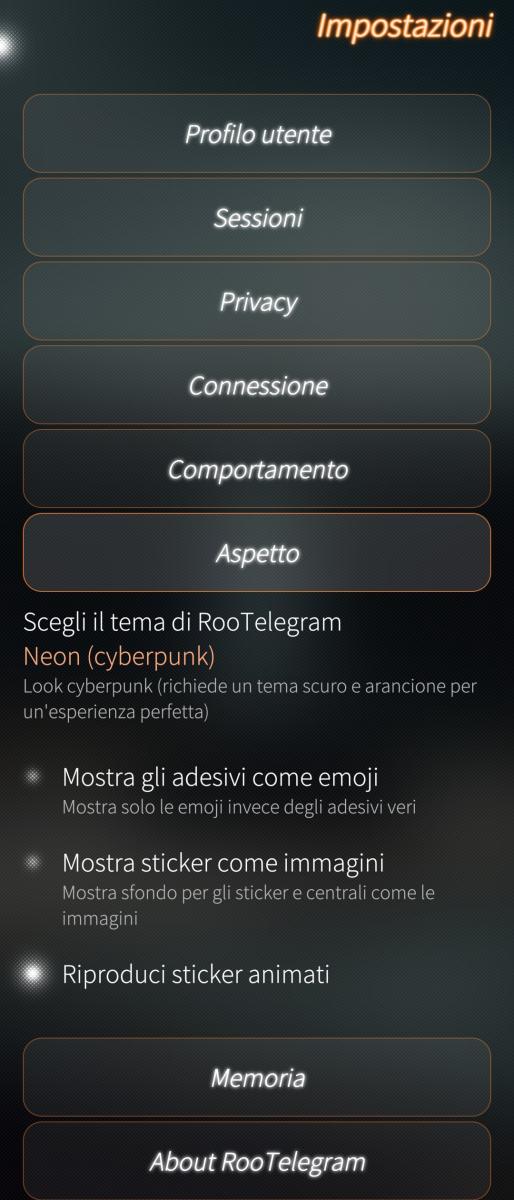
- Complete restylish (Neon Theme);
- Added audio trascription (Telegram premium members only);
- Telegram Proxy (tgpro);
- Added Draft for message;
- Added Theme Selector;
- Send GIFs as animations, and play them back in full (no more cut-off endings).
- Download and share photos and videos straight from the preview — now in private chats, groups and channels.
- Send and receive contacts, with the option to save them to the Sailfish address book.
- "Typing…" indicator in chats (both when receiving and when sending).
- Choose "Delete for everyone" or "Delete for me" when removing messages (where Telegram allows it).
- Group invite links (t.me/+…, tg://) now open directly in RooTelegram from the Sailfish browser.
- Incoming calls and video calls now turn the screen on when the phone is locked.
- One-time "What's New" popup after each update.
- Memory usage reduced by roughly 40%.
- Unread badge now always clears when you open a chat, including chats opened from a notification.
- Photo and video captions are now translated too.
- More service messages handled (join requests, group video chats, theme/wallpaper changes).
- On a locked device the screen wakes and rings; if you have set a security code, it is still required to answer (this can't be bypassed by a non-system app).
- Archived chats: new section under Settings → Storage. Open a chat with a tap;
long-press to Archive/Unarchive it.
- Story notifications now open Stories: tapping a story notification takes you
straight to the Stories page instead of just bringing the app to the foreground.
- Unseen-stories indicator: a green dot appears next to "Stories" in the menu
when one or more stories haven't been viewed yet.
- Message info: long-press a message → "Message info" to see full metadata
(sent/edited/scheduled time, sender, author signature, via bot, forwarded from +
original date, views, forwards, reactions, message ID, album ID).
- Open profiles from Story interactions: tap a viewer/reactor in your story's
viewers list to open their profile.
- Many bugfix and more stability.
- Full translations added: Polish, Russian, French (supported languages: IT, EN, DE, PL, RU, FR);
- Tap‑to‑copy for mono text: tapping a mono block copies it to the clipboard;
- Ghost draft fix (hope!): background ChatPages no longer save drafts on app close/swipe;
- Access via QR code: in addition to the number + SMS, you can now access by scanning a QR code from a device already connected to Telegram (Settings → Devices → Connect device). Especially useful on a second phone.
- New "App Permissions" page in Settings → Privacy: enable or disable access to Location, Camera, Microphone, Contacts, Images, Videos, and Files individually. This is an internal app control, divided by risk level.
- New option "Stay in chat when closing the app" in Settings → Behavior: reopening the app will find the chat open instead of returning to the home screen.
- Complete translation into Slovak (Slovenčina), thanks to okruhliak. Languages now supported: IT, EN, DE, PL, RU, FR, SK.
- RAM usage: memory freed by closing chats and putting the app in the background is now returned to the system instead of remaining occupied.
- Silica theme: the R∞Telegram text on the home screen is now smaller.
- Fix: the Location attachment now immediately shows "getting location…" while searching for GPS (previously, indoors, it gave no feedback).
- Fix: layout of the poll creation page (the button no longer overlaps the question).
- Fix: group permissions "Edit info" and "Pin messages" now show a clear message when Telegram does not allow them for all members.
- RAM usage (FINALLY!) — fixed the continuous background memory growth; when idle, the app now recycles the connection and returns RAM to the system (it could exceed 1 GB after a full day).
- Real‑time Location (Live Location): share your location and let it update automatically for 15 minutes, 1 hour, or 8 hours. While the GPS locks in, the warning “getting location…” appears. You can also send your current location as a one‑time update.
- Chat loading: fixed an issue where a chat opened showing only 3–4 messages; the full history now loads correctly.
- “Additional options” menu (long‑press on a message in a group): ban author / delete all their messages / report spam / delete message now work properly.
- Silica theme: home screen menu background is now opaque and adapts to light/dark mode.
- Translations: corrected the “New Channel” / “New Group” labels and Slovak strings (thanks to okruhliak).
- “Copy message to clipboard” shortened to “Copy message”.
- Search in messages: new global text search. From the title menu on the home screen tap "Search in messages", type a word and
RooTelegram looks for it across the messages of all your chats. Tap a result to open the chat right at that message.
- Slovak translation: completed and improved: all remaining strings translated, including the live location ones. Thanks to the
translator.
- GIF: new GIF tab in the attachments panel, with the library of saved GIFs and GIF search (tap to send).
- Quote: reply by quoting only a portion of a message's text.
- Multi-forward: forward multiple messages together.
- Mentions @ in groups: suggestions show only group members.
- Group management: remove/ban members now works; only the creator can promote/revoke admins; new "Removed/Banned" section.
- Stories: videos play to the end; the section respects the Silica theme.
- Emoji: fixed gendered emojis + recent emojis; the emoji panel stays open and does not open the keyboard.
- Touchable names in service messages ("added/removed X").
- Stability: fixed the freeze when opening the app from a notification.
- Emoji: the most recent emoji (Unicode 16/17) that used to show up as plain text now display correctly.
- Profile photo: the avatar on the profile page is no longer blank for some contacts.
- Previews: messages no longer jump around while scrolling when a photo preview loads.
- Some bugfix (Album Video & Deleted Group Ghost)
- Read message count in channels/groups → only what you scroll is marked as read (Forum Topics still reset as soon as you enter them...);
- -32 MB of space thanks to the removal of the duplicated library (symlink libtdjson).
- Fix very large channels: scrolling far back in time is now much smoother and holds up much longer before slowing down. The long freezes that used to lock the app for tens of seconds are gone in normal use; going very far back through many months can still stutter, but it's a big improvement.
- Safer startup: a loading screen with a progress bar blocks interaction until the app is ready. It prevents the freezes and crashes that could happen when tapping searches or heavy chats in the first seconds after opening.
- Start at device boot: in Settings you can have RooTelegram launch in the background when the phone powers on, so notifications arrive without opening it first. On by default; closing or killing the app does not relaunch it — autostart only happens at device boot.
- Fixed sondage.
- In certain specific circumstances, the volume remained stuck after a phone call (fixed);
- The initial call volume is boosted to 90% instead of 100%;
- Added the symbols that indicate call encryption.
Note: If some of them appear as a square (tofu) on the recipient’s phone, it simply means that the font on that device does not include the glyph for those specific emojis — it’s a rendering limitation of that device, not a difference in content and not an issue on our side.
- Added speed to audio message;
- Some video fix.
- Fixed Ghost Notifications.
- The app no longer opens automatically in full screen while you are doing something else: when it restarts in the background to free up memory, it now stays in the background.
- If you download two different files with the same name, you can now open both of them: the second one is saved as «Name (1).pdf» instead of reopening the first one.
- Saved photos and videos: likely improvement for Android apps that were rejecting them saying «unsupported format». If you experienced this, try again and let us know if it is fixed.
- Corrected the wording of the Stories count.
- Calls now behave like a regular phone call: the screen turns on by itself and the answer screen appears above the lock screen, even with a security code set. Answer, hang up, speaker and microphone are all controlled from the system controls.
- In groups with topics, opening one takes you back to where you left off instead of jumping to the end, and the unread counter goes down as you read.
- The unread count of a group with topics is now correct already in the chat list, without having to enter the group.
- Voice messages are now recorded in the format Telegram requires: they should play on iPhones too, which used to receive them empty.
- The app no longer closes unexpectedly while freeing memory in the background, and a few missing icons have been fixed.
- Calls now behave like real phone calls, even on the lock screen. Topics and their counters fixed.
- Quotes are finally rendered: colored vertical bar and indentation, on every line of the quote. Previously they were plain text, indistinguishable from the reply.
- #hashtag and $cashtag are tappable → they open global search in messages already filled in.
-17 content types that said "unsupported message" are now readable: shared stories (and mentions in a story), the four giveaway messages, invoices with product name, successful payments, dice, shared chats and contacts, proximity alerts, expired voice and video messages, auto-delete on/off, group calls and video chats.
- The quote on send was sending the quote_position field, which the TDLib schema does not know: the position never arrived and quoting a repeated phrase would highlight the wrong occurrence.
More: 24 new strings translated into 7 languages and some git hygiene (unlinked build artifacts).
- Formatting is visible while you type (WYSIWYG composer):
The B I U S buttons mark the document instead of writing markers, and the word appears already formatted during typing, not after the space.
- A word retains the format with which you saw it: pressing a key while you are still composing no longer changes its appearance afterwards.
- Monospace and spoiler on selection, with the two buttons on the left lighting up when the selection already has that style, so you understand that pressing them again removes it. On a monospace selection, the other keys turn off, because they do not combine.
- Spoiler visible in the writing field (gray background), no longer invisible until sending.
- Editing a formatted message returns it formatted, not full of symbols.
- Under the hood: a C++ bridge between the composer document and Telegram entities, the 52 points that read the text rebased on a projection, and the send passing through the real entities.
- In addition: Hand-written markers continue to work. The two paths coexist.
Changelog 3.0:
- New default theme for new users (old users must select the theme): "Barbara".
- new feature: Article (for create an article you must be Premium User).
- Fixed bot buttons.
- Fixed the color for link, username, etc...
- Fixed badge counter in Forum's Topic.
- WYSIWYG composer for text message and article.
- UPDATED TELEGRAM ENGINE: TDLib 1.8.67.
Changelog 3.1:
- Calls and volume: This version is dedicated to an issue reported by several users. Thanks to those who reported it!
- Ringtone and notifications are back to full volume after a call. After a call made with RooTelegram, on phones like Xperia and Jolla, the audio remained on the earpiece: ringtones, notifications, and music came out very quietly from there, as if the volume had dropped by 90%, until the phone was restarted. Now, at the end of a call, the audio always returns to the speaker.
- The media volume is no longer touched. Previously, every call secretly set the media volume to 90% and rewrote it at the end of the call: for some it went up, for others it went down, and it stayed that way afterwards. Now RooTelegram no longer changes any of the phone's volumes: the call starts at the volume you have chosen.
- "End Call" closes the call instantly. Sometimes the call remained open for up to a minute after pressing End, waiting for confirmation from Telegram's servers: audio on, screen on, and the phone convinced it was still in a call. Now it closes immediately, even if the confirmation arrives later.
- Two consecutive calls no longer interfere with each other. If you called back immediately after hanging up, the new call could mix with the old one that had not yet closed: it would not reach the recipient or it would close by itself. Now each call is separate, and an incoming call while you already have one in progress does not interrupt the ongoing call.
- If your phone was already affected, you only need to fix it once: in Settings → Sounds, move the ringtone slider to another value and then back to where you want it; for the media volume, use the volume buttons while something is playing. If ringtones and notifications still come out of the earpiece, restart the phone.
- Good to know: during a RooTelegram call, the volume buttons adjust the phone's media volume, not a separate call volume. If you lower it during a call, it stays low afterwards: raise it with the buttons.
Comments
RootGPT
Sat, 2026/05/16 - 22:09
Permalink
The first update is a legacy update and will show a blank screen for 10 seconds. Only from version 1.0.
Pages